Archive for November 19th, 2007

Modeling side of DLL Injection

Monday, November 19th, 2007

Component injection can be used to model various process and system software behavior by writing customized DLL/SYS and injecting them into process/kernel space. Although often depicted either as security threat or value-added hooking mechanism very little has been written about its use to model various software defects. Here I don’t mean testing but studying faulty behavior and artifacts after injecting specific DLLs with design and implementation defects. For example, forgetting to release database connections or not closing file handles. NotMyLeak is an attempt to do it for different kind of leaks on x86 and x64 Windows platforms. It uses automatic DLL injection via standard Windows hooking mechanism. Stay tuned.

- Dmitry Vostokov @ DumpAnalysis.org -  
NotMyLeak

Monday, November 19th, 2007

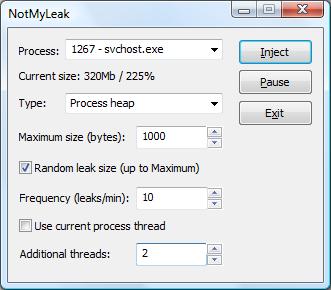
To troubleshoot and study memory leaks the following tool called NotMyLeak will be released soon. It injects different kinds of leaks into specified processes and system:

  • Process heap
  • Runtime library
  • Performance counters
  • Kernel paged pool
  • Kernel nonpaged pool
  • IRP
  • Handles
  • PTE
  • etc…

The idea is to model various real-time leaks, analyze memory dumps and then apply discovered patterns to crash dump analysis of memory dumps coming from real-world systems.   

The draft GUI (subject to change):

Note: the tool name prefix NotMy… was inspired by the name of Mark Russinovich’s tool called NotMyFault.

- Dmitry Vostokov @ DumpAnalysis.org

Windows Internals book

Monday, November 19th, 2007

Scheduled to be updated with Windows Vista and Windows Server 2008 details:

Windows® Internals, Fifth Edition

- Dmitry Vostokov @ DumpAnalysis.org

Filtering processes

Monday, November 19th, 2007

When I analyze memory dumps coming from Microsoft or Citrix terminal service environments I frequently need to find a process hosting terminal service. In Windows 2000 it was the separate process termsrv.exe and now it is termsrv.dll which can be loaded into any of several instances of svchost.exe. The simplest way to narrow down that svchost.exe process if we have a complete memory dump is to use the module option of WinDbg !process command:

!process /m termsrv.dll 0

!process /m wsxica.dll 0

!process /m ctxrdpwsx.dll 0

Note: this option works only with W2K3, XP and later OS

Also to list all processes with user space stacks having the same image name we can use:

!process 0 ff msiexec.exe

or  

!process 0 ff svchost.exe

Note: this command works with W2K too as well as session option (/s)

- Dmitry Vostokov @ DumpAnalysis.org