Archive for November 8th, 2007

TestDefaultDebugger.NET

Thursday, November 8th, 2007

Sometimes there are situations when we need to test exception handling to see whether it works and how to get dumps or logs from it. For example, a customer reports infrequent process crashes but no dumps are saved. Then we can try some application that crashes immediately to see whether it results in error messages and/or saved crash dumps. This was the motivation behind TestDefaultDebugger package. Unfortunately it contains only native applications and today I needed to test .NET CLR exception handling and see what messages it shows in my environment. So I wrote a simple program in C# that creates an empty Stack object and then calls its Pop method which triggers “Stack empty” exception sufficient for my purposes.
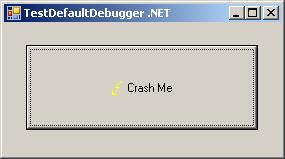
The updated package now includes TestDefaultDebugger.NET.exe and can be downloaded from Citrix support web site (requires free registration):

Download TestDefaultDebugger package

- Dmitry Vostokov @ DumpAnalysis.org -
Symbol file warnings in WinDbg 6.8.0004.0

Thursday, November 8th, 2007

I started using new WinDbg 6.8.4.0 and found that it prints the following message twice when I open a process dump or a complete memory dump where the current context is from some user mode process:

0:000> !analyze -v
...
...
...
***
***    Your debugger is not using the correct symbols
***
***    In order for this command to work properly, your symbol path
***    must point to .pdb files that have full type information.
***
***    Certain .pdb files (such as the public OS symbols) do not
***    contain the required information.  Contact the group that
***    provided you with these symbols if you need this command to
***    work.
***
***    Type referenced: kernel32!pNlsUserInfo
***

Fortunately kernel32.dll symbols were loaded correctly despite the warning:

0:000> lmv m kernel32
start    end        module name
77e40000 77f42000   kernel32   (pdb symbols)          c:\mssymbols\kernel32.pdb\DF4F569C743446809ACD3DFD1E9FA2AF2\kernel32.pdb
    Loaded symbol image file: kernel32.dll
    Image path: C:\WINDOWS\system32\kernel32.dll
    Image name: kernel32.dll
    Timestamp:        Tue Jul 25 13:31:53 2006 (44C60F39)
    CheckSum:         001059A9
    ImageSize:        00102000
    File version:     5.2.3790.2756
    Product version:  5.2.3790.2756
    File flags:       0 (Mask 3F)
    File OS:          40004 NT Win32
    File type:        2.0 Dll
    File date:        00000000.00000000
    Translations:     0409.04b0
    CompanyName:      Microsoft Corporation
    ProductName:      Microsoft® Windows® Operating System
    InternalName:     kernel32
    OriginalFilename: kernel32
    ProductVersion:   5.2.3790.2756
    FileVersion:      5.2.3790.2756 (srv03_sp1_gdr.060725-0040)
    FileDescription:  Windows NT BASE API Client DLL
    LegalCopyright:   © Microsoft Corporation. All rights reserved.

Also double checking return addresses on the stack trace shows that symbol mapping was correct (from another dump with the same message):

kd> dpu kernel32!pNlsUserInfo l1
77ecb0a8  77ecb760 "ENU"

kd> kv
ChildEBP RetAddr  Args to Child
f552bbec f79e1743 000000e2 cccccccc 858a0470 nt!KeBugCheckEx+0x1b
WARNING: Stack unwind information not available. Following frames may be wrong.
f552bc38 8081d39d 85699390 8596fe78 860515f8 SystemDump+0x743
f552bc4c 808ec789 8596fee8 860515f8 8596fe78 nt!IofCallDriver+0x45
f552bc60 808ed507 85699390 8596fe78 860515f8 nt!IopSynchronousServiceTail+0x10b
f552bd00 808e60be 00000090 00000000 00000000 nt!IopXxxControlFile+0x5db
f552bd34 80882fa8 00000090 00000000 00000000 nt!NtDeviceIoControlFile+0x2a
f552bd34 7c82ed54 00000090 00000000 00000000 nt!KiFastCallEntry+0xf8
0012efc4 7c8213e4 77e416f1 00000090 00000000 ntdll!KiFastSystemCallRet
0012efc8 77e416f1 00000090 00000000 00000000 ntdll!NtDeviceIoControlFile+0xc
0012f02c 00402208 00000090 9c400004 00947eb8 kernel32!DeviceIoControl+0×137
0012f884 00404f8e 0012fe80 00000001 00000000 SystemDump_400000+0×2208

kd> ub 77e416f1
kernel32!DeviceIoControl+0x11d:
77e416db lea     eax,[ebp-28h]
77e416de push    eax
77e416df push    ebx
77e416e0 push    ebx
77e416e1 push    ebx
77e416e2 push    dword ptr [ebp+8]
77e416e5 je      kernel32!DeviceIoControl+0x131 (77e417f3)
77e416eb call    dword ptr [kernel32!_imp__NtDeviceIoControlFile (77e4103c)]

So everything is allright and messages above shall be ignored. I also got e-mails from other people having the same problem so it seems to be related with this WinDbg release and not with my debugging environment.

- Dmitry Vostokov @ DumpAnalysis.org -
Crash Dumps for Dummies (Part 7)

Thursday, November 8th, 2007

In the previous part I introduced clear separation between crashes and hangs and outlined memory dump capturing methods for each category. However, looking from user point of view we need to tell them what is the best way to capture a dump based on observations they have and their failure level, system or component. The latter failure type usually happens with user applications and services.

For user applications the best way is to get a memory dump proactively or put in another words, manually, and do not rely on a postmortem debugger that may not be set up correctly on a problem server in 100 server farm. If any error message box appears with a message that an application stopped working or that it has encountered an application error then you can use process dumpers like userdump.exe.

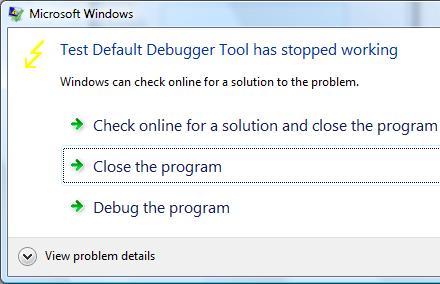
Suppose we have the following error message when TestDefaultDebugger application crashes on Vista x64 (the same technique is applicable to earlier OS too):

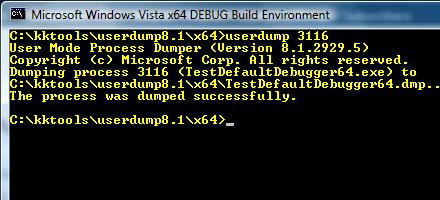
Then we can dump the process while it displays the problem if we know its process ID:

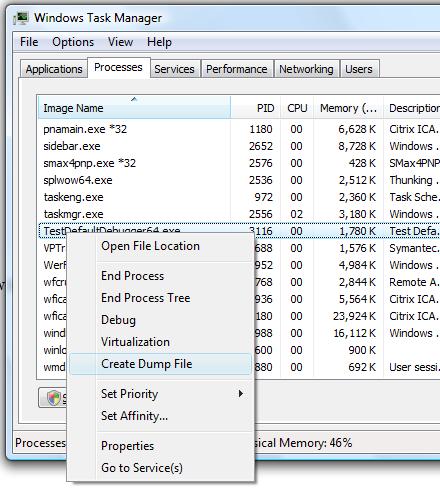
In Vista this can be done even more easily by dumping the process from Task Manager directly:

Choose Create Dump File:

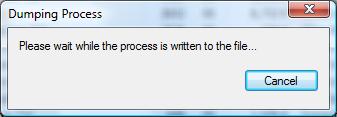
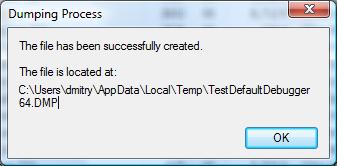
and the process dump is saved in a user location for temporary files:

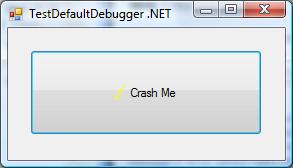
Although the application above is the native Windows application the same method applies for .NET applications. For example, the forthcoming TestDefaultDebugger.NET application

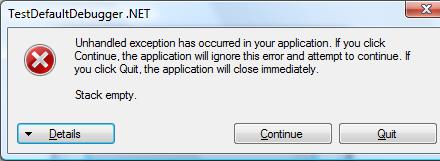
shows the following dialog:

and we can dump the process manually while it displays the message.

Although both applications will disappear from Task Manager if we choose Close or Quit on their error message boxes and therefore will be considered as crashes under my terminology, at the time when they show their stop messages they are considered as application hangs and this is why we use manual process dumpers.

Other scenarios including system failures will be considered in the next part. 

- Dmitry Vostokov @ DumpAnalysis.org -