Archive for June 28th, 2007

Correcting Microsoft article about userdump.exe

Thursday, June 28th, 2007

There is much confusion among Microsoft and Citrix customers on how to use userdump.exe to save a process dump. Microsoft published an article about userdump.exe and it has the following title:

How to use the Userdump.exe tool to create a dump file

Unfortunately all scenarios listed there start with:

1. Run the Setup.exe program for your processor.

It also says:

<…> move to the version of Userdump.exe for your processor at the command prompt 

I would like to correct the article here. You don’t need to run setup.exe, you just need to copy userdump.exe and dbghelp.dll. The latter is important because the version of that DLL in your system32 folder can be older and userdump.exe will not start:

C:\kktools\userdump8.1\x64>userdump.exe

!!!!!!!!!! Error !!!!!!!!!!
Unsupported DbgHelp.dll version.
Path   : C:\W2K3\system32\DbgHelp.dll
Version: 5.2.3790.1830

C:\kktools\userdump8.1\x64>

For most customers running setup.exe and configuring the default rules in Exception Monitor creates the significant amount of false positive dumps. If we want to manually dump a process we don’t need automatically generated dumps or fine tune Exception Monitor rules to reduce the number of dumps.

Just an additional note: if you have an error dialog box showing that a program got an exception you can find that process in Task Manager and use userdump.exe to save that process dump manually. Then inside the dump it is possible to see that error. Therefore in the case when a default postmortem debugger wasn’t configured in the registry you can still get a dump for postmortem crash dump analysis. Here is an example. I removed a postmortem debugger from

HKEY_LOCAL_MACHINE\SOFTWARE\Microsoft\Windows NT\CurrentVersion\AeDebug
Debugger=

Now if we run TestDefaultDebugger tool and hit the big crash button we get the following message box:
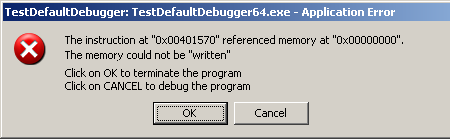
 

If we save TestDefaultDebugger process dump manually using userdump.exe when this message box is shown

C:\kktools\userdump8.1\x64>userdump.exe 5264 c:\tdd.dmp
User Mode Process Dumper (Version 8.1.2929.4)
Copyright (c) Microsoft Corp. All rights reserved.
Dumping process 5264 (TestDefaultDebugger64.exe) to
c:\tdd.dmp...
The process was dumped successfully.

and open it in WinDbg we can see the problem thread there:

0:000> kn
#  Child-SP          RetAddr           Call Site
00 00000000`0012dab8 00000000`77dbfb3b ntdll!ZwRaiseHardError+0xa
01 00000000`0012dac0 00000000`004148c6 kernel32!UnhandledExceptionFilter+0x6c8
02 00000000`0012e2f0 00000000`004165f6 TestDefaultDebugger64!__tmainCRTStartup$filt$0+0x16
03 00000000`0012e320 00000000`78ee4bdd TestDefaultDebugger64!__C_specific_handler+0xa6
04 00000000`0012e3b0 00000000`78ee685a ntdll!RtlpExecuteHandlerForException+0xd
05 00000000`0012e3e0 00000000`78ef3a5d ntdll!RtlDispatchException+0x1b4
06 00000000`0012ea90 00000000`00401570 ntdll!KiUserExceptionDispatch+0x2d
07 00000000`0012f028 00000000`00403d4d TestDefaultDebugger64!CTestDefaultDebuggerDlg::OnBnClickedButton1
08 00000000`0012f030 00000000`00403f75 TestDefaultDebugger64!_AfxDispatchCmdMsg+0xc1
09 00000000`0012f070 00000000`004030cc TestDefaultDebugger64!CCmdTarget::OnCmdMsg+0x169
0a 00000000`0012f0f0 00000000`0040c18d TestDefaultDebugger64!CDialog::OnCmdMsg+0x28
0b 00000000`0012f150 00000000`0040cfbd TestDefaultDebugger64!CWnd::OnCommand+0xc9
0c 00000000`0012f200 00000000`0040818f TestDefaultDebugger64!CWnd::OnWndMsg+0x55
0d 00000000`0012f360 00000000`0040b2e5 TestDefaultDebugger64!CWnd::WindowProc+0x33
0e 00000000`0012f3c0 00000000`0040b3d2 TestDefaultDebugger64!AfxCallWndProc+0xf1
0f 00000000`0012f480 00000000`77c439fc TestDefaultDebugger64!AfxWndProc+0x4e
10 00000000`0012f4e0 00000000`77c432ba user32!UserCallWinProcCheckWow+0x1f9
11 00000000`0012f5b0 00000000`77c4335b user32!SendMessageWorker+0x68c
12 00000000`0012f650 000007ff`7f07c5af user32!SendMessageW+0x9d
13 00000000`0012f6a0 000007ff`7f07eb8e comctl32!Button_ReleaseCapture+0x14f

The second parameter to RtlDispatchException is the pointer to the exception context so if we dump the stack trace verbosely we can get that pointer and pass it to .cxr command:

0:000> kv
Child-SP          RetAddr           : Args to Child
...
...
...
00000000`0012e3e0 00000000`78ef3a5d : 00000000`0040c9ec 00000000`0012ea90 00000000`00000001 00000000`00000111 : ntdll!RtlDispatchException+0×1b4


0:000> .cxr 00000000`0012ea90
rax=0000000000000000 rbx=0000000000000001 rcx=000000000012fd70
rdx=00000000000003e8 rsi=000000000012fd70 rdi=0000000000432e90
rip=0000000000401570 rsp=000000000012f028 rbp=0000000000000111
 r8=0000000000000000  r9=0000000000401570 r10=0000000000401570
r11=000000000015abb0 r12=0000000000000000 r13=00000000000003e8
r14=0000000000000110 r15=0000000000000001
iopl=0 nv up ei pl zr na po nc
cs=0033 ss=002b ds=002b es=002b fs=0053 gs=002b efl=00010246
TestDefaultDebugger64!CTestDefaultDebuggerDlg::OnBnClickedButton1:
00000000`00401570 c704250000000000000000 mov dword ptr [0],0 ds:00000000`00000000=????????

We see that it was NULL pointer dereference that caused the process termination. Now we can dump the full stack trace that led to our crash:

0:000> kn 100
#  Child-SP          RetAddr           Call Site
00 00000000`0012f028 00000000`00403d4d TestDefaultDebugger64!CTestDefaultDebuggerDlg::OnBnClickedButton1
01 00000000`0012f030 00000000`00403f75 TestDefaultDebugger64!_AfxDispatchCmdMsg+0xc1
02 00000000`0012f070 00000000`004030cc TestDefaultDebugger64!CCmdTarget::OnCmdMsg+0x169
03 00000000`0012f0f0 00000000`0040c18d TestDefaultDebugger64!CDialog::OnCmdMsg+0x28
04 00000000`0012f150 00000000`0040cfbd TestDefaultDebugger64!CWnd::OnCommand+0xc9
05 00000000`0012f200 00000000`0040818f TestDefaultDebugger64!CWnd::OnWndMsg+0x55
06 00000000`0012f360 00000000`0040b2e5 TestDefaultDebugger64!CWnd::WindowProc+0x33
07 00000000`0012f3c0 00000000`0040b3d2 TestDefaultDebugger64!AfxCallWndProc+0xf1
08 00000000`0012f480 00000000`77c439fc TestDefaultDebugger64!AfxWndProc+0x4e
09 00000000`0012f4e0 00000000`77c432ba user32!UserCallWinProcCheckWow+0x1f9
0a 00000000`0012f5b0 00000000`77c4335b user32!SendMessageWorker+0x68c
0b 00000000`0012f650 000007ff`7f07c5af user32!SendMessageW+0x9d
0c 00000000`0012f6a0 000007ff`7f07eb8e comctl32!Button_ReleaseCapture+0x14f
0d 00000000`0012f6d0 00000000`77c439fc comctl32!Button_WndProc+0x8ee
0e 00000000`0012f830 00000000`77c43e9c user32!UserCallWinProcCheckWow+0x1f9
0f 00000000`0012f900 00000000`77c3965a user32!DispatchMessageWorker+0x3af
10 00000000`0012f970 00000000`0040706d user32!IsDialogMessageW+0x256
11 00000000`0012fa40 00000000`0040868c TestDefaultDebugger64!CWnd::IsDialogMessageW+0x35
12 00000000`0012fa80 00000000`0040309c TestDefaultDebugger64!CWnd::PreTranslateInput+0x28
13 00000000`0012fab0 00000000`0040ae73 TestDefaultDebugger64!CDialog::PreTranslateMessage+0xc0
14 00000000`0012faf0 00000000`004047fc TestDefaultDebugger64!CWnd::WalkPreTranslateTree+0x33
15 00000000`0012fb30 00000000`00404857 TestDefaultDebugger64!AfxInternalPreTranslateMessage+0x64233]
16 00000000`0012fb70 00000000`00404a17 TestDefaultDebugger64!AfxPreTranslateMessage+0x23
17 00000000`0012fba0 00000000`00404a57 TestDefaultDebugger64!AfxInternalPumpMessage+0x37
18 00000000`0012fbe0 00000000`0040a419 TestDefaultDebugger64!AfxPumpMessage+0x1b
19 00000000`0012fc10 00000000`00403a3a TestDefaultDebugger64!CWnd::RunModalLoop+0xe5
1a 00000000`0012fc90 00000000`00401139 TestDefaultDebugger64!CDialog::DoModal+0x1ce
1b 00000000`0012fd40 00000000`0042bbbd TestDefaultDebugger64!CTestDefaultDebuggerApp::InitInstance+0xe9
1c 00000000`0012fe70 00000000`00414848 TestDefaultDebugger64!AfxWinMain+0x69
1d 00000000`0012fed0 00000000`77d5966c TestDefaultDebugger64!__tmainCRTStartup+0x258
1e 00000000`0012ff80 00000000`00000000 kernel32!BaseProcessStart+0x29

The same technique can be used to dump a process when any kind of error message box appears, for example, when a .NET application displays a .NET exception message box or a native application shows a run-time error dialog box. 

- Dmitry Vostokov @ DumpAnalysis.org -

GDB for WinDbg Users (Part 3)

Thursday, June 28th, 2007

One of the common tasks in crash dump analysis is to disassemble various functions. In GDB it can be done by using two different commands: disassemble and x/i.

The first command gets a function name, an address or a range of addresses and can be shortened to just disas:

(gdb) set disassembly-flavor intel
(gdb) disas main
Dump of assembler code for function main:
0x4012f0 <main>:        push   ebp
0x4012f1 <main+1>:      mov    ebp,esp
0x4012f3 <main+3>:      sub    esp,0x8
0x4012f6 <main+6>:      and    esp,0xfffffff0
0x4012f9 <main+9>:      mov    eax,0x0
0x4012fe <main+14>:     add    eax,0xf
0x401301 <main+17>:     add    eax,0xf
0x401304 <main+20>:     shr    eax,0x4
0x401307 <main+23>:     shl    eax,0x4
0x40130a <main+26>:     mov    DWORD PTR [ebp-4],eax
0x40130d <main+29>:     mov    eax,DWORD PTR [ebp-4]
0x401310 <main+32>:     call   0x401860 <_alloca>
0x401315 <main+37>:     call   0x401500 <__main>
0x40131a <main+42>:     mov    DWORD PTR [esp],0x403000
0x401321 <main+49>:     call   0x401950 <puts>
0x401326 <main+54>:     mov    eax,0x0
0x40132b <main+59>:     leave
0x40132c <main+60>:     ret
0x40132d <main+61>:     nop
0x40132e <main+62>:     nop
0x40132f <main+63>:     nop
End of assembler dump.
(gdb) disas 0x4012f0
Dump of assembler code for function main:
0x4012f0 <main>:        push   ebp
0x4012f1 <main+1>:      mov    ebp,esp
0x4012f3 <main+3>:      sub    esp,0x8
0x4012f6 <main+6>:      and    esp,0xfffffff0
0x4012f9 <main+9>:      mov    eax,0x0
0x4012fe <main+14>:     add    eax,0xf
0x401301 <main+17>:     add    eax,0xf
0x401304 <main+20>:     shr    eax,0x4
0x401307 <main+23>:     shl    eax,0x4
0x40130a <main+26>:     mov    DWORD PTR [ebp-4],eax
0x40130d <main+29>:     mov    eax,DWORD PTR [ebp-4]
0x401310 <main+32>:     call   0x401860 <_alloca>
0x401315 <main+37>:     call   0x401500 <__main>
0x40131a <main+42>:     mov    DWORD PTR [esp],0x403000
0x401321 <main+49>:     call   0x401950 <puts>
0x401326 <main+54>:     mov    eax,0x0
0x40132b <main+59>:     leave
0x40132c <main+60>:     ret
0x40132d <main+61>:     nop
0x40132e <main+62>:     nop
0x40132f <main+63>:     nop
End of assembler dump.
(gdb) disas 0x4012f0 0x40132d
Dump of assembler code from 0x4012f0 to 0x40132d:
0x4012f0 <main>:        push   ebp
0x4012f1 <main+1>:      mov    ebp,esp
0x4012f3 <main+3>:      sub    esp,0x8
0x4012f6 <main+6>:      and    esp,0xfffffff0
0x4012f9 <main+9>:      mov    eax,0x0
0x4012fe <main+14>:     add    eax,0xf
0x401301 <main+17>:     add    eax,0xf
0x401304 <main+20>:     shr    eax,0x4
0x401307 <main+23>:     shl    eax,0x4
0x40130a <main+26>:     mov    DWORD PTR [ebp-4],eax
0x40130d <main+29>:     mov    eax,DWORD PTR [ebp-4]
0x401310 <main+32>:     call   0x401860 <_alloca>
0x401315 <main+37>:     call   0x401500 <__main>
0x40131a <main+42>:     mov    DWORD PTR [esp],0x403000
0x401321 <main+49>:     call   0x401950 <puts>
0x401326 <main+54>:     mov    eax,0x0
0x40132b <main+59>:     leave
0x40132c <main+60>:     ret
End of assembler dump.
(gdb)

The equivalent for this command in WinDbg is uf (unassemble function) and u (unassemble):

0:000> .asm no_code_bytes
Assembly options: no_code_bytes
0:000> uf main
test!main [test.cpp @ 3]:
00401000 push    offset test!`string' (004020f4)
00401005 call    dword ptr [test!_imp__puts (004020a0)]
0040100b add     esp,4
0040100e xor     eax,eax
00401010 ret
0:000> uf 00401000
test!main [test.cpp @ 3]:
00401000 push    offset test!`string' (004020f4)
00401005 call    dword ptr [test!_imp__puts (004020a0)]
0040100b add     esp,4
0040100e xor     eax,eax
00401010 ret
0:000> u 00401000
test!main [c:\dmitri\test\test\test.cpp @ 3]:
00401000 push    offset test!`string' (004020f4)
00401005 call    dword ptr [test!_imp__puts (004020a0)]
0040100b add     esp,4
0040100e xor     eax,eax
00401010 ret
test!__security_check_cookie [f:\sp\vctools\crt_bld\self_x86\crt\src\intel\secchk.c @ 52]:
00401011 cmp     ecx,dword ptr [test!__security_cookie (00403000)]
00401017 jne     test!__security_check_cookie+0xa (0040101b)
00401019 rep ret
0:000> u 00401000 00401011
test!main [test.cpp @ 3]:
00401000 push    offset test!`string' (004020f4)
00401005 call    dword ptr [test!_imp__puts (004020a0)]
0040100b add     esp,4
0040100e xor     eax,eax
00401010 ret
0:000> u
test!__security_check_cookie [f:\sp\vctools\crt_bld\self_x86\crt\src\intel\secchk.c @ 52]:
00401011 cmp     ecx,dword ptr [test!__security_cookie (00403000)]
00401017 jne     test!__security_check_cookie+0xa (0040101b)
00401019 rep ret
0040101b jmp     test!__report_gsfailure (004012cd)
test!pre_cpp_init [f:\sp\vctools\crt_bld\self_x86\crt\src\crtexe.c @ 321]:
00401020 push    offset test!_RTC_Terminate (004014fd)
00401025 call    test!atexit (004014c7)
0040102a mov     eax,dword ptr [test!_newmode (00403364)]
0040102f mov     dword ptr [esp],offset test!startinfo (0040302c)
0:000> u eip
ntdll32!DbgBreakPoint:
7d61002d int     3
7d61002e ret
7d61002f nop
7d610030 mov     edi,edi
ntdll32!DbgUserBreakPoint:
7d610032 int     3
7d610033 ret
7d610034 mov     edi,edi
ntdll32!DbgBreakPointWithStatus:
7d610036 mov     eax,dword ptr [esp+4]

The second GDB command is x/[N]i address where N is the number of instructions to disassemble:

(gdb) x/i 0x4012f0
0x4012f0 <main>:        push   ebp
(gdb) x/2i 0x4012f0
0x4012f0 <main>:        push   ebp
0x4012f1 <main+1>:      mov    ebp,esp
(gdb) x/3i 0x4012f0
0x4012f0 <main>:        push   ebp
0x4012f1 <main+1>:      mov    ebp,esp
0x4012f3 <main+3>:      sub    esp,0x8
(gdb) x/4i $pc
0x4012f6 <main+6>:      and    esp,0xfffffff0
0x4012f9 <main+9>:      mov    eax,0x0
0x4012fe <main+14>:     add    eax,0xf
0x401301 <main+17>:     add    eax,0xf
(gdb)

I don’t know the way to disassemble just N instructions in WinDbg. However in WinDbg I can disassemble backwards (ub). This is useful, for example, if we have a return address and we want to see the CALL instruction:

0:000> k
ChildEBP RetAddr
0012ff7c 0040117a test!main [test.cpp @ 3]
0012ffc0 7d4e992a test!__tmainCRTStartup+0×10f [f:\sp\vctools\crt_bld\self_x86\crt\src\crtexe.c @ 597]
0012fff0 00000000 kernel32!BaseProcessStart+0×28
0:000> ub 7d4e992a
kernel32!BaseProcessStart+0×10:
7d4e9912 call    kernel32!BasepReport32bitAppLaunching (7d4e9949)
7d4e9917 push    4
7d4e9919 lea     eax,[ebp+8]
7d4e991c push    eax
7d4e991d push    9
7d4e991f push    0FFFFFFFEh
7d4e9921 call    dword ptr [kernel32!_imp__NtSetInformationThread (7d4d032c)]
7d4e9927 call    dword ptr [ebp+8]

So our next version of the map contains these new commands:

Action                     | GDB           | WinDbg
---------------------------------------------------
Start the process          | run           | g
Exit                       | (q)uit        | q
Disassemble (forward)      | (disas)semble | uf, u
Disassemble N instructions | x/i           | -
Disassemble (backward)     | -             | ub

- Dmitry Vostokov @ DumpAnalysis.org -

When a process dies silently

Thursday, June 28th, 2007

There are cases when default postmortem debugger doesn’t save a dump file. This is because the default postmortem debugger is called from the crashed application thread on Windows prior to Vista and if a thread stack is exhausted or critical thread data is corrupt there is no user dump.  On Vista the default postmorten debugger is called from WER (Windows Error Reporting) process WerFault.exe so there is a chance that it can save a user dump. During my experiments today on Windows 2003 (x64) I found that if we have a stack overflow inside a 64-bit process then the process silently dies. This doesn’t happen for 32-bit processes on the same server on a native 32-bit OS. Here is the added code from the modified default Win32 API project created in Visual Studio 2005:

...
volatile DWORD dwSupressOptimization;
...
void SoFunction();
...
LRESULT CALLBACK WndProc(HWND hWnd, UINT message, WPARAM wParam, LPARAM lParam)
{
...
  case WM_PAINT:
     hdc = BeginPaint(hWnd, &ps);
     SoFunction();
     EndPaint(hWnd, &ps);
     break;
...
}
...
void SoFunction()
{
  if (++dwSupressOptimization)
  {
     SoFunction();
     WndProc(0,0,0,0);
  }
}

Adding WndProc call to SoFunction is done to eliminate an optimization in Release build when a recursion call is transformed into a loop:

void SoFunction()
{
  if (++dwSupressOptimization)
  {
     SoFunction();
  }
}

0:001> uf SoFunction
00401300 mov     eax,1
00401305 jmp     StackOverflow!SoFunction+0x10 (00401310)
00401310 add     dword ptr [StackOverflow!dwSupressOptimization (00403374)],eax
00401316 mov     ecx,dword ptr [StackOverflow!dwSupressOptimization (00403374)]
0040131c jne     StackOverflow!SoFunction+0x10 (00401310)
0040131e ret

Therefore without WndProc added or more complicated SoFunction there is no stack overflow but a loop with 4294967295 (0xFFFFFFFF) iterations.

If we compile an x64 project with WndProc call included in SoFunction and run it we would never get a dump from any default postmortem debugger although TestDefaultDebugger64 tool crashes with a dump. I also observed a strange behavior that the application disappears only during the second window repaint although it shall crash immediately when we launch it and the main window is shown. What I have seen is when I launch the application it is running and the main window is visible. When I force it to repaint by minimizing and then maximizing, for example, only then it disappears from the screen and the process list.

If we launch 64-bit WinDbg, load and run our application we would hit the first chance exception:

0:000> g
(159c.fc4): Stack overflow - code c00000fd (first chance)
First chance exceptions are reported before any exception handling.
This exception may be expected and handled.
StackOverflow!SoFunction+0x22:
00000001`40001322 e8d9ffffff call StackOverflow!SoFunction (00000001`40001300)

Stack trace looks like normal stack overflow:

0:000> k
Child-SP          RetAddr           Call Site
00000000`00033fe0 00000001`40001327 StackOverflow!SoFunction+0x22
00000000`00034020 00000001`40001327 StackOverflow!SoFunction+0x27
00000000`00034060 00000001`40001327 StackOverflow!SoFunction+0x27
00000000`000340a0 00000001`40001327 StackOverflow!SoFunction+0x27
00000000`000340e0 00000001`40001327 StackOverflow!SoFunction+0x27
00000000`00034120 00000001`40001327 StackOverflow!SoFunction+0x27
00000000`00034160 00000001`40001327 StackOverflow!SoFunction+0x27
00000000`000341a0 00000001`40001327 StackOverflow!SoFunction+0x27
00000000`000341e0 00000001`40001327 StackOverflow!SoFunction+0x27
00000000`00034220 00000001`40001327 StackOverflow!SoFunction+0x27
00000000`00034260 00000001`40001327 StackOverflow!SoFunction+0x27
00000000`000342a0 00000001`40001327 StackOverflow!SoFunction+0x27
00000000`000342e0 00000001`40001327 StackOverflow!SoFunction+0x27
00000000`00034320 00000001`40001327 StackOverflow!SoFunction+0x27
00000000`00034360 00000001`40001327 StackOverflow!SoFunction+0x27
00000000`000343a0 00000001`40001327 StackOverflow!SoFunction+0x27
00000000`000343e0 00000001`40001327 StackOverflow!SoFunction+0x27
00000000`00034420 00000001`40001327 StackOverflow!SoFunction+0x27
00000000`00034460 00000001`40001327 StackOverflow!SoFunction+0x27
00000000`000344a0 00000001`40001327 StackOverflow!SoFunction+0x27

RSP was inside stack guard page during the CALL instruction.

0:000> r
rax=0000000000003eed rbx=00000000000f26fe rcx=0000000077c4080a
rdx=0000000000000000 rsi=000000000000000f rdi=0000000000000000
rip=0000000140001322 rsp=0000000000033fe0 rbp=00000001400035f0
 r8=000000000012fb18 r9=00000001400035f0 r10=0000000000000000
r11=0000000000000246 r12=000000000012fdd8 r13=000000000012fd50
r14=00000000000f26fe r15=0000000000000000
iopl=0 nv up ei pl nz na po nc
cs=0033 ss=002b ds=002b es=002b fs=0053 gs=002b efl=00010206
StackOverflow!SoFunction+0×22:
00000001`40001322 e8d9ffffff call StackOverflow!SoFunction (00000001`40001300)

0:000> uf StackOverflow!SoFunction
00000001`40001300 sub     rsp,38h
00000001`40001304 mov     rax,qword ptr [StackOverflow!__security_cookie (00000001`40003000)]
00000001`4000130b xor     rax,rsp
00000001`4000130e mov     qword ptr [rsp+20h],rax
00000001`40001313 add     dword ptr [StackOverflow!dwSupressOptimization (00000001`400035e4)],1
00000001`4000131a mov     eax,dword ptr [StackOverflow!dwSupressOptimization (00000001`400035e4)]
00000001`40001320 je      StackOverflow!SoFunction+0×37 (00000001`40001337)
00000001`40001322 call    StackOverflow!SoFunction (00000001`40001300)
00000001`40001327 xor     r9d,r9d
00000001`4000132a xor     r8d,r8d
00000001`4000132d xor     edx,edx
00000001`4000132f xor     ecx,ecx
00000001`40001331 call    qword ptr [StackOverflow!_imp_DefWindowProcW (00000001`40002198)]
00000001`40001337 mov     rcx,qword ptr [rsp+20h]
00000001`4000133c xor     rcx,rsp
00000001`4000133f call    StackOverflow!__security_check_cookie (00000001`40001360)
00000001`40001344 add     rsp,38h
00000001`40001348 ret

However this guard page is not the last stack page as can be seen from TEB and the current RSP address (0×33fe0):

0:000> !teb
TEB at 000007fffffde000
    ExceptionList:        0000000000000000
    StackBase:            0000000000130000
    StackLimit:           0000000000031000
    SubSystemTib:         0000000000000000
    FiberData:            0000000000001e00
    ArbitraryUserPointer: 0000000000000000
    Self:                 000007fffffde000
    EnvironmentPointer:   0000000000000000
    ClientId:             000000000000159c . 0000000000000fc4
    RpcHandle:            0000000000000000
    Tls Storage:          0000000000000000
    PEB Address:          000007fffffd5000
    LastErrorValue:       0
    LastStatusValue:      c0000135
    Count Owned Locks:    0
    HardErrorMode:        0

If we continue execution and force the main application window to invalidate (repaint) itself we get another first chance exception instead of second chance:

0:000> g
(159c.fc4): Access violation - code c0000005 (first chance)
First chance exceptions are reported before any exception handling.
This exception may be expected and handled.
StackOverflow!SoFunction+0x22:
00000001`40001322 call StackOverflow!SoFunction (00000001`40001300)

What we see now is that RSP is outside the valid stack region (stack limit) 0×31000:

0:000> k
Child-SP          RetAddr           Call Site
00000000`00030ff0 00000001`40001327 StackOverflow!SoFunction+0×22
00000000`00031030 00000001`40001327 StackOverflow!SoFunction+0×27
00000000`00031070 00000001`40001327 StackOverflow!SoFunction+0×27
00000000`000310b0 00000001`40001327 StackOverflow!SoFunction+0×27
00000000`000310f0 00000001`40001327 StackOverflow!SoFunction+0×27
00000000`00031130 00000001`40001327 StackOverflow!SoFunction+0×27
00000000`00031170 00000001`40001327 StackOverflow!SoFunction+0×27
00000000`000311b0 00000001`40001327 StackOverflow!SoFunction+0×27
00000000`000311f0 00000001`40001327 StackOverflow!SoFunction+0×27
00000000`00031230 00000001`40001327 StackOverflow!SoFunction+0×27
00000000`00031270 00000001`40001327 StackOverflow!SoFunction+0×27
00000000`000312b0 00000001`40001327 StackOverflow!SoFunction+0×27
00000000`000312f0 00000001`40001327 StackOverflow!SoFunction+0×27
00000000`00031330 00000001`40001327 StackOverflow!SoFunction+0×27
00000000`00031370 00000001`40001327 StackOverflow!SoFunction+0×27
00000000`000313b0 00000001`40001327 StackOverflow!SoFunction+0×27
00000000`000313f0 00000001`40001327 StackOverflow!SoFunction+0×27
00000000`00031430 00000001`40001327 StackOverflow!SoFunction+0×27
00000000`00031470 00000001`40001327 StackOverflow!SoFunction+0×27
00000000`000314b0 00000001`40001327 StackOverflow!SoFunction+0×27
0:000> r
rax=0000000000007e98 rbx=00000000000f26fe rcx=0000000077c4080a
rdx=0000000000000000 rsi=000000000000000f rdi=0000000000000000
rip=0000000140001322 rsp=0000000000030ff0 rbp=00000001400035f0
 r8=000000000012faa8  r9=00000001400035f0 r10=0000000000000000
r11=0000000000000246 r12=000000000012fd68 r13=000000000012fce0
r14=00000000000f26fe r15=0000000000000000
iopl=0 nv up ei pl nz na pe nc
cs=0033 ss=002b ds=002b es=002b fs=0053 gs=002b efl=00010202
StackOverflow!SoFunction+0×22:
00000001`40001322 call    StackOverflow!SoFunction (00000001`40001300)

Therefore we expect the second chance exception at the same address here and we get it indeed when we continue execution:

0:000> g
(159c.fc4): Access violation - code c0000005 (!!! second chance !!!)
StackOverflow!SoFunction+0x22:
00000001`40001322 call    StackOverflow!SoFunction (00000001`40001300)

Now we see why the process died silently. There was no stack space left for exception dispatch handler functions and therefore for the default unhandled exception filter that launches the default postmortem debugger to save a process dump. So it looks like on x64 Windows when our process had first chance stack overflow exception there was no second chance exception afterwards and after handling first chance stack overflow exception process execution resumed and finally hit its thread stack limit. This doesn’t happen with 32-bit processes even on x64 Windows where unhandled first chance stack overflow exception results in immediate second chance stack overflow exception at the same stack address and therefore there is a sufficient room for the local variables for exception handler and filter functions.

This is an example of what happened before exception handling changes in Vista.

- Dmitry Vostokov @ DumpAnalysis.org -