Archive for the ‘Mac Crash Corner’ Category

GDB Annoyances: Incomplete Stack Trace

Sunday, March 25th, 2012

Users of WinDbg debugger accustomed to full thread stack traces will wonder whether a thread starts from main:

(gdb) where
#0  0x000000010d3b0e90 in bar () at main.c:15
#1  0x000000010d3b0ea9 in foo () at main.c:20
#2  0x000000010d3b0ec4 in main (argc=1,
argv=0x7fff6cfafbf8) at main.c:25

Of course, not and by default a stack trace is shown starting from main function. You can change this behavior by using the following command:

(gdb) set backtrace past-main

Now we see an additional frame:

(gdb) where
#0  0x000000010d3b0e90 in bar () at main.c:15
#1  0x000000010d3b0ea9 in foo () at main.c:20
#2  0x000000010d3b0ec4 in main (argc=1,
argv=0x7fff6cfafbf8) at main.c:25
#3  0×000000010d3b0e74 in start ()

- Dmitry Vostokov @ DumpAnalysis.org + TraceAnalysis.org -

Forthcoming Training: Accelerated Mac OS X Core Dump Analysis

Crash Dump Analysis Patterns (Part 6b, Mac OS X)

Sunday, March 25th, 2012

This is a Mac OS X / GDB counterpart to NULL Pointer (data) pattern previously described for Windows platforms:

(gdb) bt
#0  0×000000010d3b0e90 in bar () at main.c:15
#1  0×000000010d3b0ea9 in foo () at main.c:20
#2  0×000000010d3b0ec4 in main (argc=1,
argv=0×7fff6cfafbf8) at main.c:25

(gdb) disassemble
Dump of assembler code for function bar:
0x000000010d3b0e80 <bar+0>: push   %rbp
0×000000010d3b0e81 <bar+1>: mov    %rsp,%rbp
0×000000010d3b0e84 <bar+4>: movq   $0×0,-0×8(%rbp)
0×000000010d3b0e8c <bar+12>: mov    -0×8(%rbp),%rax
0×000000010d3b0e90 <bar+16>: movl   $0×1,(%rax)
0×000000010d3b0e96 <bar+22>: pop    %bp
0×000000010d3b0e97 <bar+23>: retq
End of assembler dump.

(gdb) p/x $rax
$1 = 0×0

- Dmitry Vostokov @ DumpAnalysis.org + TraceAnalysis.org -

Forthcoming Training: Accelerated Mac OS X Core Dump Analysis

Accelerated Mac OS X Core Dump Analysis Training

Saturday, March 3rd, 2012

Accelerated Mac OS X Core Dump Analysis Logo

Memory Dump Analysis Services organizes a new training course:

Description: Learn how to analyze app crashes and freezes, navigate through process core memory dump space and diagnose corruption, memory leaks, CPU spikes, blocked threads, deadlocks, wait chains, and much more. We use a unique and innovative pattern-driven analysis approach to speed up the learning curve. The training consists of practical step-by-step exercises using Xcode and GDB environments highlighting various patterns diagnosed in 64-bit process core memory dumps. The training also includes an overview of relevant similarities and differences between Windows and Mac OS X user space memory dump analysis useful for engineers with Wintel background.

If you are registered you are allowed to optionally submit your app core dumps before the training. This will allow us in addition to the carefully constructed problems tailor additional examples to the needs of the attendees.

The training consists of 2 two-hour sessions. When you finish the training you additionally get:

  1. A full transcript in PDF format (retail price $200)
  2. 6 volumes of Memory Dump Analysis Anthology in PDF format (retail price $120)
  3. A personalized attendance certificate with unique CID (PDF format)
  4. Mac OS X Debugging: Practical Foundations in PDF format (retail price $15)
  5. Free Dump Analysis World Network membership including updates to full PDF transcript Q&A section

Prerequisites: Basic Mac OS X troubleshooting and debugging

Audience: Software technical support and escalation engineers, system administrators, software developers and quality assurance engineers.

Session 1: October 19, 2012 4:00 PM - 6:00 PM BST
Session 2: October 22, 2012 4:00 PM - 6:00 PM BST

Price: 210 USD

Space is limited.
Reserve your remote training seat now at:
https://student.gototraining.com/r/3803636572165653760

If you are mainly interested in Windows memory dump analysis there is another course available:

Accelerated Windows Memory Dump Analysis

- Dmitry Vostokov @ DumpAnalysis.org + TraceAnalysis.org -

Forthcoming Accelerated Mac OS X Core Dump Analysis training

Wednesday, February 1st, 2012

Memory Dump Analysis Services plans to introduce Mac OS X memory dump analysis training this year based on the success of its Windows variant. For details and how to register please visit this page:

http://www.dumpanalysis.com/accelerated-mac-os-x-core-dump-analysis

- Dmitry Vostokov @ DumpAnalysis.org + TraceAnalysis.org -

Professional Software Debugging Services

Tuesday, January 31st, 2012

Memory Dump Analysis Services starts providing debugging training and assistance in addition to (based on) memory dump and software trace analysis. It has recently registered www.debugging.pro domain and is working on extending its courses to cover live debugging and additional OS platforms this year.

- Dmitry Vostokov @ DumpAnalysis.org + TraceAnalysis.org -

A Bug Meets a Bug (The Clash of Civilizations)

Saturday, January 28th, 2012

- Dmitry Vostokov @ DumpAnalysis.org + TraceAnalysis.org -

Presentation from Webinar: Introduction to Pattern-Driven Software Problem Solving

Saturday, March 26th, 2011

The presentation materials from the webinar (25th of March, 2011) are available for download:

http://www.dumpanalysis.com/PDSPSI-materials

Thanks to everyone who registered and attended!

- Dmitry Vostokov @ DumpAnalysis.org + TraceAnalysis.org -

Forthcoming Webinar: Introduction to Pattern-Driven Software Problem Solving

Monday, March 7th, 2011

Introduction to Pattern-Driven Software Problem Solving Logo

The first Webinar to start an in-depth discussion of pattern-driven software troubleshooting, debugging and maintenance:

Date: 25th of March 2011
Time: 18:30 (GMT) 14:30 (EST) 11:30 (PST)
Duration: 60 minutes

Space is limited.
Reserve your Webinar seat now at:
https://www3.gotomeeting.com/register/448268158

Topics include:

  • A Short History of DumpAnalysis.org
  • Memory Dump Analysis Patterns
  • Troubleshooting and Debugging Tools (Debugware) Patterns
  • Software Trace Analysis Patterns
  • From Software Defects to Software Behavior
  • Workaround Patterns
  • Structural Memory Patterns
  • Memory Analysis Domain Pattern Hierarchy
  • New Directions

Prerequisites: experience in software troubleshooting and/or debugging.

- Dmitry Vostokov @ DumpAnalysis.org + TraceAnalysis.org -

Welcome to Memory Dump Analysis Services!

Sunday, July 11th, 2010

Our future sponsor has been registered in Ireland and has its own independent website and logo: DumpAnalysis.com

More information will be available later this month.

- Dmitry Vostokov @ DumpAnalysis.org + TraceAnalysis.org -

Memory Dump and Software Trace Analysis Training and Seminars

Friday, April 9th, 2010

Plan to start providing training and seminars in my free time. If you are interested please answer these questions (you can either respond here in comments or use this form for private communication http://www.dumpanalysis.org/contact):

  • Are you interested in on-site training, prefer traveling or attending webinars?
  • Are you interested in software trace analysis as well?
  • What specific topics are you interested in?
  • What training level (beginner, intermediate, advanced) are you interested in? (please provide an example, if possible)

Additional topics of expertise that can be integrated into training include Source Code Reading and Analysis, Debugging, Windows Architecture, Device Drivers, Troubleshooting Tools Design and Implementation, Multithreading, Deep Down C and C++, x86 and x64 Assembly Language Reading.

Looking forward to your responses. Any suggestions are welcome.

- Dmitry Vostokov @ DumpAnalysis.org + TraceAnalysis.org -

Mod N Reading Now (Part 1)

Sunday, March 21st, 2010

I originally intended to name this blog post as ”What I’m Reading Now” but then decided to show it as another satisfying example of my Mod N Reading technique. During my 7 years in memory dump analysis captivity I didn’t pay much attention to traditional synthetic software engineering (as opposed to analytical software defect research in computer memory) except occasionally writing some troubleshooting tools, describing DebugWare patterns in UML and devising RADII process. A few weeks ago I decided to brush up my engineering skills and read some books that accumulated in my library during last few years. Here is the list of them (debugging triptych of Windows Internals 5th Edition, Advanced Windows Debugging, and Advanced .NET Debugging are on my office table and I read them almost daily so I’m not including them in the list below).

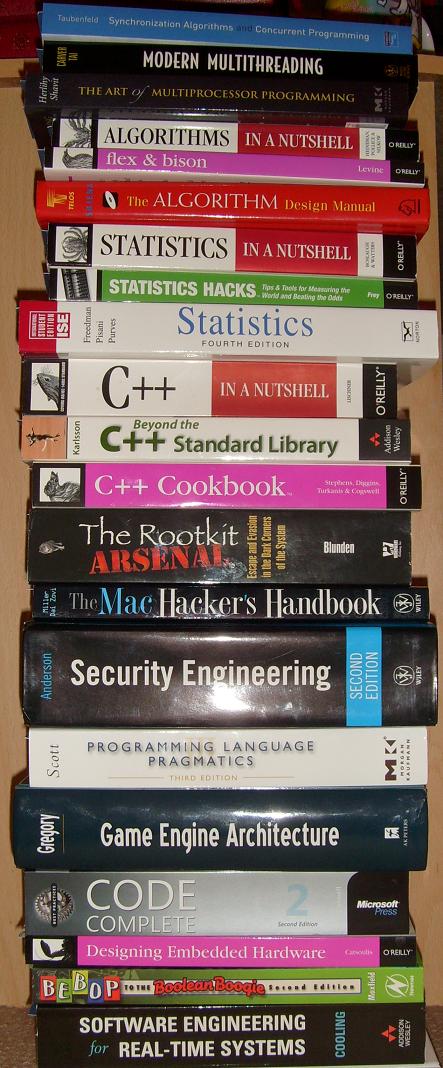
Illustrated Mod N is actually Mod 7 technique where I cycle through 7 topics with 3 books for each topic. Ideally I aim to dedicate one topic per day every week but this is not always possible due to writing and publishing but I still do it in a Mod 7 way even if I skip some days. it usually takes me an hour or two to read carefully 5-10 pages from each of 3 topical books. Here is the current state of the reading round-robin queue (21 books) under my home computer desk:

Here are the topics and corresponding books (with links if you would like to buy them from Amazon):

Multithreading from Computer Science Perspective

Synchronization Algorithms and Concurrent Programming

Modern Multithreading : Implementing, Testing, and Debugging Multithreaded Java and C++/Pthreads/Win32 Programs

The Art of Multiprocessor Programming

Algorithms, Parsing

Algorithms in a Nutshell

Buy from Amazon

Flex & Bison: Text Processing Tools

The Algorithm Design Manual

Statistics 

Statistics in a Nutshell: A Desktop Quick Reference

Statistics Hacks: Tips & Tools for Measuring the World and Beating the Odds

Statistics, 4th Edition

C++, STL and Boost 

C++ in a Nutshell

Beyond the C++ Standard Library: An Introduction to Boost

C++ Cookbook

Security, Mac OS X

The Rootkit Arsenal: Escape and Evasion in the Dark Corners of the System

Buy from Amazon

The Mac Hacker’s Handbook

Security Engineering: A Guide to Building Dependable Distributed Systems

Code, Games

Programming Language Pragmatics, Third Edition

Game Engine Architecture

Code Complete: A Practical Handbook of Software Construction

Embedded and Real-Time Software Engineering

Designing Embedded Hardware

Bebop to the Boolean Boogie, Third Edition: An Unconventional Guide to Electronics

Software Engineering for Real-Time Systems

Buy from Amazon

- Dmitry Vostokov @ DumpAnalysis.org + TraceAnalysis.org -

Plans for The Year of Dump Analysis

Monday, January 18th, 2010

After exciting results of  the previous year of debugging it is time to announce modest plans for this year, 0×7DA:

Release the first beta version of EasyDbg

Release the first beta version of CARE (Crash Analysis Report Environment) for a pattern-driven debugger log analyzer with standards for structured audience-driven reports

Release the first beta version of STARE (Software Trace Analysis Report Environment) for a pattern-driven software trace analyzer with corresponding standards for structured audience-driven reports

Publish the following books on dump analysis that address different audiences (general users, system administrators, support and escalation engineers, testers, software engineers, security and software defect researchers):

Windows Debugging Notebook
Crash Dump Analysis for System Administrators and Support Engineers
- Memory Dump Analysis Anthology, Volume 4
- Memory Dump Analysis Anthology, Volume 5
- Memory Dump Analysis Anthology Color Supplement
- Principles of Memory Dump Analysis
- My Computer Crashes and Freezes: A Non-technical Guide to Software and Hardware Errors
- Linux, FreeBSD and Mac OS X Debugging: Practical Foundations
- Encyclopedia of Crash Dump Analysis Patterns
- WinDbg In Use: Debugging Exercises

Publish articles related to memory dump analysis in Debugged! magazine

Update WinDbg Poster and Cards

- Dmitry Vostokov @ DumpAnalysis.org + TraceAnalysis.org -

More Practical Foundations Series

Tuesday, August 4th, 2009

OpenTask plans to expand its Practical Foundations series and publish the following 2 books for the forthcoming Memory Dump Analysis Fundamentals certification (Unix track) being developed by Memory Analysis and Debugging Institute:

  • Linux, FreeBSD and Mac OS X Debugging: Practical Foundations (ISBN: 978-1906717773)

  • 64-bit Linux, FreeBSD and Mac OS X Debugging: Practical Foundations (ISBN: 978-1906717780)

  • - Dmitry Vostokov @ DumpAnalysis.org -

    Deadlocks in iPhone

    Friday, July 24th, 2009

    One of the authors of June Debugged! MZ/PE issue, Kapildev Ramlal, published a short article about XCode debugging of multithreaded deadlocks and a few GDB commands:

    Episode 1 of XCode iPhone Debugging Adventures

    - Dmitry Vostokov @ DumpAnalysis.org -

    Mac Crash Corner: Blame Module

    Friday, May 16th, 2008

    It looks like Microsoft has introduced the “Blame Module” concept in addition to the old Windows “Crashed Module” terminology in Microsoft Error Reporting for Mac OS X. I noticed that yesterday when the freshly installed out of the box Microsoft Word 2008 for Mac crashed on my new MacBook Air. Digging into the report I noticed this:

    Microsoft Error Reporting log version: 2.0

    Error Signature:
    Exception: EXC_BAD_ACCESS
    Date/Time: 2008-05-16 01:15:21 +0100
    Application Name: Microsoft Word
    Application Bundle ID: com.microsoft.Word
    Application Signature: MSWD
    Application Version: 12.0.0.071130
    Crashed Module Name: HIToolbox
    Crashed Module Version: unknown
    Crashed Module Offset: 0x0006118f
    Blame Module Name: HIToolbox
    Blame Module Version: unknown
    Blame Module Offset: 0×0006118f

    Application LCID: 1033
    Extra app info: Reg=en Loc=0×0409

    In the report itself it is nice to see stack traces and thread context in familiar Intel syntax:

    Thread 0 crashed:
    #  1  0x9037018f in .objc_class_name_IPMDFontRange + 0x9004556F (HIToolbox + 0x0006118f)
    #  2  0x9036ff53 in .objc_class_name_IPMDFontRange + 0x90045333 (HIToolbox + 0x00060f53)
    #  3  0x9036edaa in .objc_class_name_IPMDFontRange + 0x9004418A (HIToolbox + 0x0005fdaa)
    #  4  0x9036a9b5 in .objc_class_name_IPMDFontRange + 0x9003FD95 (HIToolbox + 0x0005b9b5)
    #  5  0x903f99da in .objc_class_name_IPMDFontRange + 0x900CEDBA (HIToolbox + 0x000ea9da)
    #  6  0x01661a53 in _McpSetWindowBrush + 0x000001E7 (MicrosoftComponentPlugin + 0x000eba53)
    #  7  0x90316fc3 in .objc_class_name_IPMDFontRange + 0x8FFEC3A3 (HIToolbox + 0x00007fc3)
    #  8  0x903163fd in .objc_class_name_IPMDFontRange + 0x8FFEB7DD (HIToolbox + 0x000073fd)
    #  9  0x90332e0e in .objc_class_name_IPMDFontRange + 0x900081EE (HIToolbox + 0x00023e0e)
    # 10  0x90345dcf in .objc_class_name_IPMDFontRange + 0x9001B1AF (HIToolbox + 0x00036dcf)
    # 11  0x9031737c in .objc_class_name_IPMDFontRange + 0x8FFEC75C (HIToolbox + 0x0000837c)
    # 12  0x903163fd in .objc_class_name_IPMDFontRange + 0x8FFEB7DD (HIToolbox + 0x000073fd)
    # 13  0x90332e0e in .objc_class_name_IPMDFontRange + 0x900081EE (HIToolbox + 0x00023e0e)
    # 14  0x01661c05 in _McpFDispatchEventRef + 0x00000073 (MicrosoftComponentPlugin + 0x000ebc05)
    # 15  0x01662195 in _McpRunApplicationEventLoop + 0x0000051B (MicrosoftComponentPlugin + 0x000ec195)
    # 16  0x00ae3e6b in _wdCommandDispatch + 0x007C7EC3 (Microsoft Word + 0x00ae2e6b)
    # 17  0x00aecd18 in _wdCommandDispatch + 0x007D0D70 (Microsoft Word + 0x00aebd18)
    # 18  0x02236080 in __WlmMain + 0x00000047 (MicrosoftOffice + 0x004a2080)
    # 19  0x00ad2438 in _wdCommandDispatch + 0x007B6490 (Microsoft Word + 0x00ad1438)
    # 20  0x000028e2 in __mh_execute_header + 0x000018E2 (Microsoft Word + 0x000018e2)
    # 21  0x00002809 in __mh_execute_header + 0x00001809 (Microsoft Word + 0x00001809)

    X86 Thread State:
     eax: 0x00000000  ebx: 0x903700a9  ecx: 0x00000001  edx:0x00000000
     edi: 0xbfffede4  esi: 0x1e895cb0  ebp: 0xbfffeb58  esp:0xbfffead0
      ss: 0x0000001f  eip: 0x9037018f   cs: 0x00000017   ds:0x0000001f
      es: 0x0000001f   fs: 0x00000000   gs: 0x00000037  eflags:0x00010246

    Thread 1:
    #  1  0x91870b06 in _signgam + 0x916D22C6 (libSystem.B.dylib + 0x00000b06)
    #  2  0x918f97eb in _signgam + 0x9175AFAB (libSystem.B.dylib + 0x000897eb)
    #  3  0x01aa4265 in _MerpCreateSession + 0x00000B05 (merp + 0x00002265)
    #  4  0x01aa38cd in _MerpCreateSession + 0x0000016D (merp + 0x000018cd)
    #  5  0x01aa3954 in _MerpCreateSession + 0x000001F4 (merp + 0x00001954)
    #  6  0x01aa440d in _MerpCreateSession + 0x00000CAD (merp + 0x0000240d)
    #  7  0x918a1c55 in _signgam + 0x91703415 (libSystem.B.dylib + 0x00031c55)
    #  8  0x918a1b12 in _signgam + 0x917032D2 (libSystem.B.dylib + 0x00031b12)

    X86 Thread State:
     eax: 0xffffffa6  ebx: 0x918e8609  ecx: 0xb00a0a5c  edx:0x91870b06
     edi: 0x0000001f  esi: 0x3cadb317  ebp: 0xb00a0ac8  esp:0xb00a0a5c
      ss: 0x0000001f  eip: 0x91870b06   cs: 0x00000007   ds:0x0000001f
      es: 0x0000001f   fs: 0x0000001f   gs: 0x00000037  eflags:0x00000202

    Thread 2:
    #  1  0x91877bce in _signgam + 0x916D938E (libSystem.B.dylib + 0x00007bce)
    #  2  0x918a28cd in _signgam + 0x9170408D (libSystem.B.dylib + 0x000328cd)
    #  3  0x91a03460 in __CMProfileID + 0x9193033C (ColorSync + 0x00033460)
    #  4  0x91a15d92 in __CMProfileID + 0x91942C6E (ColorSync + 0x00045d92)
    #  5  0x918a1c55 in _signgam + 0x91703415 (libSystem.B.dylib + 0x00031c55)
    #  6  0x918a1b12 in _signgam + 0x917032D2 (libSystem.B.dylib + 0x00031b12)

    X86 Thread State:
     eax: 0x0000014e  ebx: 0x918a28ed  ecx: 0xb0122e7c  edx:0x91877bce
     edi: 0x05042fa4  esi: 0xb0123000  ebp: 0xb0122ef8  esp:0xb0122e7c
      ss: 0x0000001f  eip: 0x91877bce   cs: 0x00000007   ds:0x0000001f
      es: 0x0000001f   fs: 0x0000001f   gs: 0x00000037  eflags:0x00000246

    Thread 3:
    #  1  0x918d0036 in _signgam + 0x917317F6 (libSystem.B.dylib + 0x00060036)
    #  2  0x016e7552 in _FWaitForConnection + 0x0000002A (MicrosoftComponentPlugin + 0x00171552)
    #  3  0x015f58b8 in _McpFInitNetworkPIDChecking + 0x0000111C (MicrosoftComponentPlugin + 0x0007f8b8)
    #  4  0x96683beb in __gTECMasterGlobals + 0x9639F5AB (CarbonCore + 0x00048beb)
    #  5  0x918a1c55 in _signgam + 0x91703415 (libSystem.B.dylib + 0x00031c55)
    #  6  0x918a1b12 in _signgam + 0x917032D2 (libSystem.B.dylib + 0x00031b12)

    X86 Thread State:
     eax: 0x000c0194  ebx: 0x015f5867  ecx: 0xb01add3c  edx:0x918d0036
     edi: 0x04000000  esi: 0xb01adf24  ebp: 0xb01add58  esp:0xb01add3c
      ss: 0x0000001f  eip: 0x918d0036   cs: 0x00000007   ds:0x0000001f
      es: 0x0000001f   fs: 0x0000001f   gs: 0x00000037  eflags:0x00000282

    Thread 4:
    #  1  0x918b9f16 in _signgam + 0x9171B6D6 (libSystem.B.dylib + 0x00049f16)
    #  2  0x016e75dd in _FReceiveMessage + 0x00000077 (MicrosoftComponentPlugin + 0x001715dd)
    #  3  0x015f5566 in _McpFInitNetworkPIDChecking + 0x00000DCA (MicrosoftComponentPlugin + 0x0007f566)
    #  4  0x96683beb in __gTECMasterGlobals + 0x9639F5AB (CarbonCore + 0x00048beb)
    #  5  0x918a1c55 in _signgam + 0x91703415 (libSystem.B.dylib + 0x00031c55)
    #  6  0x918a1b12 in _signgam + 0x917032D2 (libSystem.B.dylib + 0x00031b12)

    X86 Thread State:
     eax: 0x00000193  ebx: 0x015f54d7  ecx: 0xb022fcac  edx:0x918b9f16
     edi: 0xb022fec4  esi: 0xb022ff34  ebp: 0xb022fcd8  esp:0xb022fcac
      ss: 0x0000001f  eip: 0x918b9f16   cs: 0x00000007   ds:0x0000001f
      es: 0x0000001f   fs: 0x0000001f   gs: 0x00000037  eflags:0x00000282

    Thread 5:
    #  1  0x91870a3a in _signgam + 0x916D21FA (libSystem.B.dylib + 0x00000a3a)
    #  2  0x015f5c7b in _McpFInitNetworkPIDChecking + 0x000014DF (MicrosoftComponentPlugin + 0x0007fc7b)
    #  3  0x96683beb in __gTECMasterGlobals + 0x9639F5AB (CarbonCore + 0x00048beb)
    #  4  0x918a1c55 in _signgam + 0x91703415 (libSystem.B.dylib + 0x00031c55)
    #  5  0x918a1b12 in _signgam + 0x917032D2 (libSystem.B.dylib + 0x00031b12)

    X86 Thread State:
     eax: 0xffffffda  ebx: 0x96696f0f  ecx: 0xb02b1e5c  edx:0x91870a3a
     edi: 0xb02b1f36  esi: 0x00000000  ebp: 0xb02b1e88  esp:0xb02b1e5c
      ss: 0x0000001f  eip: 0x91870a3a   cs: 0x00000007   ds:0x0000001f
      es: 0x0000001f   fs: 0x0000001f   gs: 0x00000037  eflags:0x00000246

    Loaded modules:
    0: Microsoft Word (12.0.0.071130 Reg=en Loc=0x0409): /Applications/Microsoft Office 2008/Microsoft Word.app/Contents/MacOS/Microsoft Word
    [...]

    Operating System Information
    Operating System: Mac OS X 10.5.2 (Build 9C3033)
    CPU: Intel Core Duo, Number: 2, Speed: 1600 MHz
    gestaltPhysicalRAMSize err = 0, result = 2047 MB
    gestaltSystemVersion err = 0, result = 0x1052
    Screen: 1280 x 800, depth = 32, ltbr = 0, 0, 800, 1280

    Microsoft Application Information:
    Error Reporting UUID: 1B018C67-56E8-4516-B277-B474CDE25846
    Time from launch: 0 hours, 0 minutes, 27 seconds
    Total errors on this client: 1

    I installed Microsoft Office 2008 SP1 and hope it resolves the issue.

    - Dmitry Vostokov @ DumpAnalysis.org -

    Introducing Mac Crash Corner

    Friday, May 16th, 2008

    As a happy owner of an Apple MacBook Air Laptop I’m introducing the new blog category where I’m going to dig into crash dump analysis on Mac OS X and FreeBSD whenever an occasion happens.

    Buy from Amazon

    In order to seamlessly analyze Windows crash dumps and use WinDbg I also bought VMware Fusion

    Buy from Amazon

    and Microsoft Office 2008 for Mac to write about my experience:

    Buy from Amazon

    - Dmitry Vostokov @ DumpAnalysis.org -