Archive for the ‘AntiPatterns’ Category

Crash Dump Analysis AntiPatterns (Part 5)

Thursday, November 1st, 2007

Fooled by Description or the first incursion into Psychology of Memory Dump Analysis 

From my observation an engineer with software development background opens a crash dump after glancing at a problem description provided by a customer or even without reading it first. Only if the problem is not immediately obvious from the memory dump file the engineer will read the problem description thoroughly. On the contrary, an engineer with technical support or system administration background will thoroughly read the problem description first. In the latter case the description might influence the direction of analysis.

Here is an example. The description says - slow application start and you have a memory dump from a process. An engineer with technical support background will most likely look for hang patterns inside the dump. An engineer with experience writing native applications in C and C++ will open the dump and check an exception stored in it and if it is a breakpoint the suspicion might arise that the memory dump was taken manually because of the hanging process. Based on analysis the engineer might even correct the problem description or add questions that clarify the discrepancy between what is seen in the dump and what users perceive.

- Dmitry Vostokov @ DumpAnalysis.org -
Crash Dump Analysis AntiPatterns (Part 4)

Thursday, March 1st, 2007

A customer reports application.exe crashes and you ask for a dump file. You get a dump, open it and see the dump is not from your application.exe. You ask for print spooler crash dump and you get mplayer.exe crash dump. I originally thought to call it Wrong Dump pattern and place it into patterns category but after writing about Zippocricy I clearly see it as anti-pattern. It is not a rocket science to check process name in a dump file before sending it for analysis:

  • Load the user process dump in WinDbg
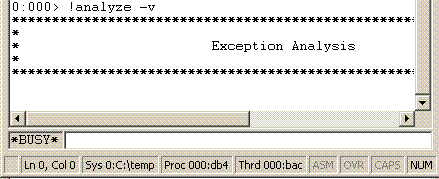
  • Type command .symfix; .reload; !analyze -v and wait


until WinDbg is not busy analyzing

  • Find PROCESS_NAME: in the output. You get something like:

PROCESS_NAME: spoolsv.exe

You can also use dumpchk.exe from Debugging Tools for Windows.

I’m also writing a new version of Citrix DumpCheck Explorer extension that will include process name in its output.  

Another example is when you ask for a complete memory dump but you get a kernel dump or you get various mini-dumps. Fortunately DumpCheck extension can  warn users before they submit a dump.

- Dmitry Vostokov -

Crash Dump Analysis AntiPatterns (Part 3)

Wednesday, February 28th, 2007

I have heard engineers saying, “I didn’t know about this debugging command, let’s use it!” after training session or reading other people’s analysis of crash dumps. A year later I hear the same phrase from them about another debugging command. In the mean time they continue to use the same set of commands they know about until they hear the old new one.

This is a manifestation of Word of Mouth anti-pattern.

General solution: Know your tools. Study them proactively. RTFM.

Example solution: periodically read and re-read WinDbg help.

More refined solution: debugger.chm on Windows Mobile PC.

- Dmitry Vostokov -

Crash Dump Analysis AntiPatterns (Part 2)

Wednesday, February 28th, 2007

Let’s define Zippocricy - common sin in software support environments worldwide: someone gets something from a customer in archived form and without checking the contents forwards it further to another person in support chain. By the time the evidence gets unzipped somewhere, checked and found corrupt or irrelevant the customer suffers not hours but days.

Happens not only with crash dumps but with any type of problem evidence. 

- Dmitry Vostokov -

Crash Dump Analysis AntiPatterns (Part 1)

Wednesday, November 1st, 2006

In any domain of activity where patterns exist we can find anti-patterns too. They are bad solutions for recurrent problems in specific contexts. One of them I would like to introduce briefly is Alien Component. In essence, when every technique fails or you run out of WinDbg commands look at some innocent component you have never seen before or don’t have symbols for: be it some driver or hook. Of course, this component cannot be the component developed by the company you are working for. :-)

- Dmitry Vostokov -