Archive for May, 2008

Memory Dump Illustrated

Friday, May 16th, 2008

This is a picture from PubForum event gallery. I’m on the left and Rich Crusco, MVP, Citrix Technical Evangelist for Application Delivery and Virtualization technologies, is on the right. Visitors often think that these books are just on crash dumps… Click on it to enlarge:

More pictures can be found on here.

 - Dmitry Vostokov @ DumpAnalysis.org -

Mac Crash Corner: Blame Module

Friday, May 16th, 2008

It looks like Microsoft has introduced the “Blame Module” concept in addition to the old Windows “Crashed Module” terminology in Microsoft Error Reporting for Mac OS X. I noticed that yesterday when the freshly installed out of the box Microsoft Word 2008 for Mac crashed on my new MacBook Air. Digging into the report I noticed this:

Microsoft Error Reporting log version: 2.0

Error Signature:
Exception: EXC_BAD_ACCESS
Date/Time: 2008-05-16 01:15:21 +0100
Application Name: Microsoft Word
Application Bundle ID: com.microsoft.Word
Application Signature: MSWD
Application Version: 12.0.0.071130
Crashed Module Name: HIToolbox
Crashed Module Version: unknown
Crashed Module Offset: 0x0006118f
Blame Module Name: HIToolbox
Blame Module Version: unknown
Blame Module Offset: 0×0006118f

Application LCID: 1033
Extra app info: Reg=en Loc=0×0409

In the report itself it is nice to see stack traces and thread context in familiar Intel syntax:

Thread 0 crashed:
#  1  0x9037018f in .objc_class_name_IPMDFontRange + 0x9004556F (HIToolbox + 0x0006118f)
#  2  0x9036ff53 in .objc_class_name_IPMDFontRange + 0x90045333 (HIToolbox + 0x00060f53)
#  3  0x9036edaa in .objc_class_name_IPMDFontRange + 0x9004418A (HIToolbox + 0x0005fdaa)
#  4  0x9036a9b5 in .objc_class_name_IPMDFontRange + 0x9003FD95 (HIToolbox + 0x0005b9b5)
#  5  0x903f99da in .objc_class_name_IPMDFontRange + 0x900CEDBA (HIToolbox + 0x000ea9da)
#  6  0x01661a53 in _McpSetWindowBrush + 0x000001E7 (MicrosoftComponentPlugin + 0x000eba53)
#  7  0x90316fc3 in .objc_class_name_IPMDFontRange + 0x8FFEC3A3 (HIToolbox + 0x00007fc3)
#  8  0x903163fd in .objc_class_name_IPMDFontRange + 0x8FFEB7DD (HIToolbox + 0x000073fd)
#  9  0x90332e0e in .objc_class_name_IPMDFontRange + 0x900081EE (HIToolbox + 0x00023e0e)
# 10  0x90345dcf in .objc_class_name_IPMDFontRange + 0x9001B1AF (HIToolbox + 0x00036dcf)
# 11  0x9031737c in .objc_class_name_IPMDFontRange + 0x8FFEC75C (HIToolbox + 0x0000837c)
# 12  0x903163fd in .objc_class_name_IPMDFontRange + 0x8FFEB7DD (HIToolbox + 0x000073fd)
# 13  0x90332e0e in .objc_class_name_IPMDFontRange + 0x900081EE (HIToolbox + 0x00023e0e)
# 14  0x01661c05 in _McpFDispatchEventRef + 0x00000073 (MicrosoftComponentPlugin + 0x000ebc05)
# 15  0x01662195 in _McpRunApplicationEventLoop + 0x0000051B (MicrosoftComponentPlugin + 0x000ec195)
# 16  0x00ae3e6b in _wdCommandDispatch + 0x007C7EC3 (Microsoft Word + 0x00ae2e6b)
# 17  0x00aecd18 in _wdCommandDispatch + 0x007D0D70 (Microsoft Word + 0x00aebd18)
# 18  0x02236080 in __WlmMain + 0x00000047 (MicrosoftOffice + 0x004a2080)
# 19  0x00ad2438 in _wdCommandDispatch + 0x007B6490 (Microsoft Word + 0x00ad1438)
# 20  0x000028e2 in __mh_execute_header + 0x000018E2 (Microsoft Word + 0x000018e2)
# 21  0x00002809 in __mh_execute_header + 0x00001809 (Microsoft Word + 0x00001809)

X86 Thread State:
 eax: 0x00000000  ebx: 0x903700a9  ecx: 0x00000001  edx:0x00000000
 edi: 0xbfffede4  esi: 0x1e895cb0  ebp: 0xbfffeb58  esp:0xbfffead0
  ss: 0x0000001f  eip: 0x9037018f   cs: 0x00000017   ds:0x0000001f
  es: 0x0000001f   fs: 0x00000000   gs: 0x00000037  eflags:0x00010246

Thread 1:
#  1  0x91870b06 in _signgam + 0x916D22C6 (libSystem.B.dylib + 0x00000b06)
#  2  0x918f97eb in _signgam + 0x9175AFAB (libSystem.B.dylib + 0x000897eb)
#  3  0x01aa4265 in _MerpCreateSession + 0x00000B05 (merp + 0x00002265)
#  4  0x01aa38cd in _MerpCreateSession + 0x0000016D (merp + 0x000018cd)
#  5  0x01aa3954 in _MerpCreateSession + 0x000001F4 (merp + 0x00001954)
#  6  0x01aa440d in _MerpCreateSession + 0x00000CAD (merp + 0x0000240d)
#  7  0x918a1c55 in _signgam + 0x91703415 (libSystem.B.dylib + 0x00031c55)
#  8  0x918a1b12 in _signgam + 0x917032D2 (libSystem.B.dylib + 0x00031b12)

X86 Thread State:
 eax: 0xffffffa6  ebx: 0x918e8609  ecx: 0xb00a0a5c  edx:0x91870b06
 edi: 0x0000001f  esi: 0x3cadb317  ebp: 0xb00a0ac8  esp:0xb00a0a5c
  ss: 0x0000001f  eip: 0x91870b06   cs: 0x00000007   ds:0x0000001f
  es: 0x0000001f   fs: 0x0000001f   gs: 0x00000037  eflags:0x00000202

Thread 2:
#  1  0x91877bce in _signgam + 0x916D938E (libSystem.B.dylib + 0x00007bce)
#  2  0x918a28cd in _signgam + 0x9170408D (libSystem.B.dylib + 0x000328cd)
#  3  0x91a03460 in __CMProfileID + 0x9193033C (ColorSync + 0x00033460)
#  4  0x91a15d92 in __CMProfileID + 0x91942C6E (ColorSync + 0x00045d92)
#  5  0x918a1c55 in _signgam + 0x91703415 (libSystem.B.dylib + 0x00031c55)
#  6  0x918a1b12 in _signgam + 0x917032D2 (libSystem.B.dylib + 0x00031b12)

X86 Thread State:
 eax: 0x0000014e  ebx: 0x918a28ed  ecx: 0xb0122e7c  edx:0x91877bce
 edi: 0x05042fa4  esi: 0xb0123000  ebp: 0xb0122ef8  esp:0xb0122e7c
  ss: 0x0000001f  eip: 0x91877bce   cs: 0x00000007   ds:0x0000001f
  es: 0x0000001f   fs: 0x0000001f   gs: 0x00000037  eflags:0x00000246

Thread 3:
#  1  0x918d0036 in _signgam + 0x917317F6 (libSystem.B.dylib + 0x00060036)
#  2  0x016e7552 in _FWaitForConnection + 0x0000002A (MicrosoftComponentPlugin + 0x00171552)
#  3  0x015f58b8 in _McpFInitNetworkPIDChecking + 0x0000111C (MicrosoftComponentPlugin + 0x0007f8b8)
#  4  0x96683beb in __gTECMasterGlobals + 0x9639F5AB (CarbonCore + 0x00048beb)
#  5  0x918a1c55 in _signgam + 0x91703415 (libSystem.B.dylib + 0x00031c55)
#  6  0x918a1b12 in _signgam + 0x917032D2 (libSystem.B.dylib + 0x00031b12)

X86 Thread State:
 eax: 0x000c0194  ebx: 0x015f5867  ecx: 0xb01add3c  edx:0x918d0036
 edi: 0x04000000  esi: 0xb01adf24  ebp: 0xb01add58  esp:0xb01add3c
  ss: 0x0000001f  eip: 0x918d0036   cs: 0x00000007   ds:0x0000001f
  es: 0x0000001f   fs: 0x0000001f   gs: 0x00000037  eflags:0x00000282

Thread 4:
#  1  0x918b9f16 in _signgam + 0x9171B6D6 (libSystem.B.dylib + 0x00049f16)
#  2  0x016e75dd in _FReceiveMessage + 0x00000077 (MicrosoftComponentPlugin + 0x001715dd)
#  3  0x015f5566 in _McpFInitNetworkPIDChecking + 0x00000DCA (MicrosoftComponentPlugin + 0x0007f566)
#  4  0x96683beb in __gTECMasterGlobals + 0x9639F5AB (CarbonCore + 0x00048beb)
#  5  0x918a1c55 in _signgam + 0x91703415 (libSystem.B.dylib + 0x00031c55)
#  6  0x918a1b12 in _signgam + 0x917032D2 (libSystem.B.dylib + 0x00031b12)

X86 Thread State:
 eax: 0x00000193  ebx: 0x015f54d7  ecx: 0xb022fcac  edx:0x918b9f16
 edi: 0xb022fec4  esi: 0xb022ff34  ebp: 0xb022fcd8  esp:0xb022fcac
  ss: 0x0000001f  eip: 0x918b9f16   cs: 0x00000007   ds:0x0000001f
  es: 0x0000001f   fs: 0x0000001f   gs: 0x00000037  eflags:0x00000282

Thread 5:
#  1  0x91870a3a in _signgam + 0x916D21FA (libSystem.B.dylib + 0x00000a3a)
#  2  0x015f5c7b in _McpFInitNetworkPIDChecking + 0x000014DF (MicrosoftComponentPlugin + 0x0007fc7b)
#  3  0x96683beb in __gTECMasterGlobals + 0x9639F5AB (CarbonCore + 0x00048beb)
#  4  0x918a1c55 in _signgam + 0x91703415 (libSystem.B.dylib + 0x00031c55)
#  5  0x918a1b12 in _signgam + 0x917032D2 (libSystem.B.dylib + 0x00031b12)

X86 Thread State:
 eax: 0xffffffda  ebx: 0x96696f0f  ecx: 0xb02b1e5c  edx:0x91870a3a
 edi: 0xb02b1f36  esi: 0x00000000  ebp: 0xb02b1e88  esp:0xb02b1e5c
  ss: 0x0000001f  eip: 0x91870a3a   cs: 0x00000007   ds:0x0000001f
  es: 0x0000001f   fs: 0x0000001f   gs: 0x00000037  eflags:0x00000246

Loaded modules:
0: Microsoft Word (12.0.0.071130 Reg=en Loc=0x0409): /Applications/Microsoft Office 2008/Microsoft Word.app/Contents/MacOS/Microsoft Word
[...]

Operating System Information
Operating System: Mac OS X 10.5.2 (Build 9C3033)
CPU: Intel Core Duo, Number: 2, Speed: 1600 MHz
gestaltPhysicalRAMSize err = 0, result = 2047 MB
gestaltSystemVersion err = 0, result = 0x1052
Screen: 1280 x 800, depth = 32, ltbr = 0, 0, 800, 1280

Microsoft Application Information:
Error Reporting UUID: 1B018C67-56E8-4516-B277-B474CDE25846
Time from launch: 0 hours, 0 minutes, 27 seconds
Total errors on this client: 1

I installed Microsoft Office 2008 SP1 and hope it resolves the issue.

- Dmitry Vostokov @ DumpAnalysis.org -

Introducing Mac Crash Corner

Friday, May 16th, 2008

As a happy owner of an Apple MacBook Air Laptop I’m introducing the new blog category where I’m going to dig into crash dump analysis on Mac OS X and FreeBSD whenever an occasion happens.

Buy from Amazon

In order to seamlessly analyze Windows crash dumps and use WinDbg I also bought VMware Fusion

Buy from Amazon

and Microsoft Office 2008 for Mac to write about my experience:

Buy from Amazon

- Dmitry Vostokov @ DumpAnalysis.org -

PubForum, Dublin, 2008

Thursday, May 15th, 2008

PubForum pictures are available where you can see me selling Crash Dump Tools to the audience and explaining broken clipboard chains:

Pictures

All presentations from that event are available  here:

Presentations

My presentation is also available here:

Citrix Tools: PubForum Presentation

- Dmitry Vostokov @ DumpAnalysis.org -

Spring Into Technical Publishing

Wednesday, May 14th, 2008

The following books helped me immensely to get up to speed with self-publishing.

Write Faster, Write Better

Buy from Amazon

This book shows the power of write-page(s)-a-day process where writing incrementally adds up to a book.

Aiming at Amazon: The NEW Business of Self Publishing, or How to Publish Books for Less, Sell Without Hassle, and Double Your Profit (or More) With Print on Demand and Book Marketing on Amazon.com

Buy from Amazon

The book recommends to register as a publisher and use Lightning Source as POD printer and distribution channel.

Perfect Pages: Self Publishing with Microsoft Word, or How to Avoid High-Priced Page Layout Programs or Book Design Fees and Produce Fine Books in MS Word for Desktop Publishing and Print on Demand

Buy from Amazon

Use Microsoft Word to prepare your book. Very good chapters about indexing and cover design. The latter can be created in MS Word too!

POD People: Beating the Print-on-Demand Stigma

Buy from Amazon

This is the book that I recently discovered and read. Although the author discusses POD in the context of fiction publishing it has some good points to remember even if you self-publish professional and technical books. It recommends to use Lulu as POD printer and distributor. I find it useful if you plan to publish one book only. However if you plan to be a full-blown publisher you should use POD services for publishers like Lightning Source.

Hope this helps. I’m also reading other self-publishing and marketing books at the moment and will post reviews of them soon.

- Dmitry Vostokov @ DumpAnalysis.org -

Technical Books as Software

Wednesday, May 14th, 2008

I thought I discovered the concept “Books as Software” but Google search reveals that it was done before me by Shriram Krishnamurthi:

http://www.cs.brown.edu/~sk/Memos/Books-as-Software/

It’s good to see that I wasn’t alone to notice this concept after publishing my first book on Lulu. However I went further and registered as a publisher and now use Lightning Source for long term publishing through Ingram and online bookstores like Amazon. Lulu now serves the purpose of a bookstore, instant publishing to test concepts, and also to publish in formats that are not available through Lightning Source.

Moving forward and thinking about multiple books brings us to consider book series as software product lines as well. We also need some kind of a management process that I call Iterative and Incremental Publishing taken from the family of scalable Unified Processes like Rational that I am used to. Scaled down to just one book it can be called Iterative and Incremental Writing as well. I was thinking about during past two months and finally came up with an idea to release a short book in October to help others to spring into technical self-publishing and writing especially software engineers. Iterative and Incremental Writing techniques can also be applied to traditional publishing as well where you already have an accepted book proposal similar to vision and requirements documentation and perhaps you have a draft chapter and table of contents that can be considered as a working software prototype.

The forthcoming book has the following draft product details:

  • Title: Technical Books As Software: Iterative and Incremental Writing and Publishing
  • Author: Dmitry Vostokov
  • Publisher: Opentask (15 October 2008)
  • Language: English
  • Product Dimensions: 22.86 x 15.24
  • ISBN-13: 978-1-906717-03-2
  • Paperback: 128 pages

I think there is a big difference between technical and other book genres like fiction so I decided to limit myself to technical book writing and publishing although some concepts of iterative and incremental development can be applied to other book categories as well where a process needs to be established to achieve the writing and publishing goals.

- Dmitry Vostokov @ DumpAnalysis.org -

Citrix Tools: PubForum Presentation

Tuesday, May 13th, 2008

Here is the presentation PDF file:

Citrix Tools - everything you need for troubleshooting, optimization and analysis

It is based on my previous presentation with a few added slides which can be downloaded from Citrix support web site:

Selected Citrix Troubleshooting Tools

- Dmitry Vostokov @ DumpAnalysis.org -

ETW Tracing Tools

Tuesday, May 13th, 2008

There are few tools available. Please drop a comment if you know any other. As the focus here is mainly troubleshooting Citrix terminal service environments I put links to Citrix articles where possible:

- Dmitry Vostokov @ DumpAnalysis.org -

How old is your application or system?

Monday, May 12th, 2008

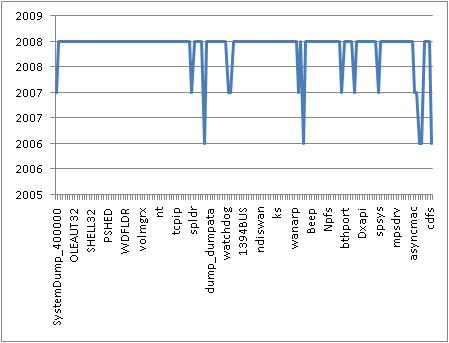
Component Age Diagram (CAD) helps to visualize and pinpoint anomalies in component timestamps. Excel helps here. We can import the output of lmt WinDbg command and get these graphs where peaks can be used to identify old modules. For example, here is a CAD from my Windows Vista SP1 running on MacMini:

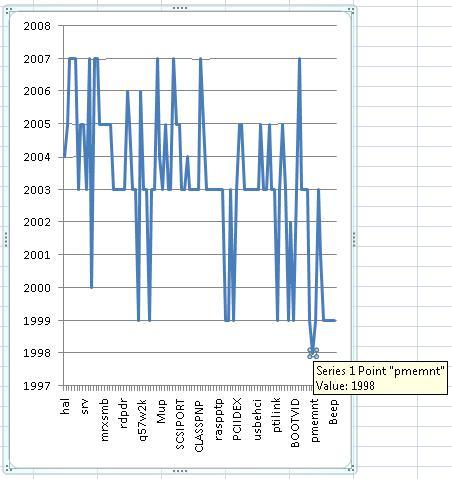
Here is another CAD from Windows 2000 server where the oldest driver is easily identified:

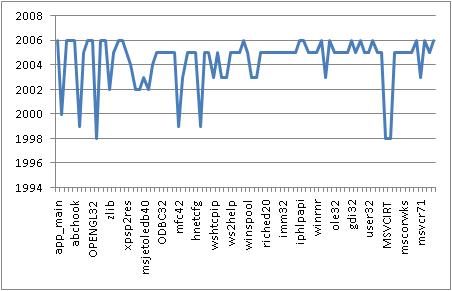
The following CAD diagram is created from lmt output in Module Variety pattern example:

- Dmitry Vostokov @ DumpAnalysis.org -

WinDbg cheat sheet for crash dump analysis

Friday, May 9th, 2008

Thanks to Volker who noticed WinDbg online help I was able to quickly update my HTML version of CDA Poster to point to online links instead of the local help CHM file:

http://www.dumpanalysis.org/CDAPoster.html

It is also featured on http://www.windbg.org

I’m also working on the better version that will be released simultaneuosly with WDN book.

- Dmitry Vostokov @ DumpAnalysis.org -

New WinDbg Release 6.9.3.113

Thursday, May 8th, 2008

As always you can quickly get it through WinDbg Quick Links page:

http://www.windbg.org

- Dmitry Vostokov @ DumpAnalysis.org -

STL and WinDbg

Thursday, May 8th, 2008

Some applications are written using Standard Template Library and it is good that there is !stl WinDbg extension which works with a few types from Plauger’s STL implementation used in Visual C++ CRT library:

0:000> !stl
!stl [options] <varname>
  stl [options] <varname> - dumps an STL variable
  stl [options] -n <type-name> <address>
             currently works with string, wstring
             vector<string>, vector<wstring>
             list<string>, vector<wstring>
             (and pointer varieties therein)
   [options]
       -n <type-name> The name of the type. If the
               type has spaces, surround with
               parentheses ().
       -v      verbose output
       -V      extremely verbose output

If we have public symbols and know variable names we can simply dump their values, for example:

0:000> dv /i /V
prv local  @ecx @ecx            this = 0x0012fbdc
prv local  0012fbf8 @ebp-0x2c   MyName = class std::basic_string<char,std::char_traits<char>,std::allocator<char> >

0:000> !stl MyName
[da 0x12fbfc]
0012fbfc  "COMPANY__NAME"

We can also supply full STL type name:

0:000> !stl -n (std::basic_string<char,std::char_traits<char>,std::allocator<char> >) 0012fbf8
[da 0x12fbfc]
0012fbfc  "COMPANY__NAME"

Let’s dump this string type internal structure to be able to recognize it later in raw data:

0:000> dt -r -n std::basic_string<char,std::char_traits<char>,std::allocator<char> > 0012fbf8
application!std::basic_string<char,std::char_traits<char>,std::allocator<char> >
   +0x000 _Alval           : std::allocator<char>
   =00400000 npos             : 0x905a4d
   +0×004 _Bx              : std::basic_string<char,std::char_traits<char>,std::allocator<char> >::_Bxty
      +0×000 _Buf             : [16]  “COMPANY__NAME”

      +0×000 _Ptr             : 0×43415250  “”
   +0×014 _Mysize          : 0xd
   +0×018 _Myres           : 0xf

We see that for short strings less than 16 bytes std::basic_string<char> data starts from offset +4 and followed by the actual string size and its reserved size:

0:000> dd 0012fbf8
0012fbf8  00000000 43415250 45434954 53504d5f
0012fc08  41bf00
33 0000000d 0000000f 41bf3b72
0012fc18  0012fc6c 0046107b 00000000 0012fc78
0012fc28  0041a441 00000000 41bf3b2e 00ed6380
0012fc38  00000003 00ed6128 00ed6128 00f41b00
0012fc48  00ed6128 41bf3b3e 0012fc3c 00000000
0012fc58  0000000f 00f41b98 00f469a0 00000000
0012fc68  014487c8 0012fcfc 00463fdd 00000002

For bigger strings implementation starts with a pointer from offset +4 to the actual string data and then followed by 12 bytes of garbage and then by the actual string size and its reserved size:

0:000> dt -r -n std::basic_string<char,std::char_traits<char>,std::allocator<char> >
application!std::basic_string<char,std::char_traits<char>,std::allocator<char> >
   +0x000 _Alval           : std::allocator<char>
   =00400000 npos             : Uint4B
   +0×004 _Bx              : std::basic_string<char,std::char_traits<char>,std::allocator<char> >::_Bxty
      +0×000 _Buf             : [16] Char
      +0×000 _Ptr             : Ptr32 Char
   +0×014 _Mysize          : Uint4B
   +0×018 _Myres           : Uint4B

0:000> dt -r -n std::basic_string<char,std::char_traits<char>,std::allocator<char> > 0012ff08
application!std::basic_string<char,std::char_traits<char>,std::allocator<char> >
   +0x000 _Alval           : std::allocator<char>
   =00400000 npos             : 0x905a4d
   +0×004 _Bx              : std::basic_string<char,std::char_traits<char>,std::allocator<char> >::_Bxty
      +0×000 _Buf             : [16]  “???”
      +0×000 _Ptr             : 0×00ed4ba0  “/h /c:100 /enum”
   +0×014 _Mysize          : 0×10
   +0×018 _Myres           : 0×1f

In such cases dpa or dpu commands help to show this additional dereference:

0:000> dpa 0012ff08
0012ff08  00ed2f90 "."
0012ff0c  00ed4ba0 “/h /c:100 /enum”
0012ff10  41eafd01
0012ff14  0012ffc0 “…”
0012ff18  0045890a “……U..SVWUj”

0012ff1c  00000010
0012ff20  0000001f

0012ff24  41bf3996
0012ff28  0012ffc0 “…”
0012ff2c  0044b528 “.E..}.”
0012ff30  00400000 “MZ.”

SDbgExt has commands to interrogate additional STL types.  

- Dmitry Vostokov @ DumpAnalysis.org -

Citrix Tools at PubForum

Wednesday, May 7th, 2008

I’m presenting Citrix Tools at the famous PubForum event. It is a non-commercial Microsoft Terminal Services, Citrix, Virtualization and Server-Based Computing event. This year PubForum is held in Dublin, Republic of Ireland. See the final event details and agenda:

PubForum, 2008

My presentation date, time and topic are:

Friday, May 9, 19:00 “Citrix Tools - everything you need for troubleshooting, optimization and analysis”

See you there :-)

- Dmitry Vostokov @ DumpAnalysis.org -

Crash Dump Analysis Patterns (Part 10a)

Wednesday, May 7th, 2008

Optimized VM Layout is a specialization of the general Changed Environment pattern where the whole modules are moved in virtual memory by changing their load order and load addresses. This can result in dormant bugs being exposed and one of workarounds usually is to disable such external optimization programs or services or adding applications that behave improperly to exclusion lists. Some optimized virtual memory cases can easily be detected by looking at module list where system DLLs are remapped to lower addresses instead of 0×7X000000 range:

0:000> lm
start    end        module name
00400000 00416000   Application
00470000 0050b000   advapi32
00520000 00572000   shlwapi
02340000 023cb000   oleaut32

04b80000 0523e000   System_Data_ni
1a400000 1a524000   urlmon
4dd60000 4df07000   GdiPlus
5f120000 5f12e000   ntlanman
5f860000 5f891000   netui1
5f8a0000 5f8b6000   netui0
637a0000 63d28000   System_Xml_ni
64890000 6498c000   System_Configuration_ni
64e70000 6515c000   System_Data
65ce0000 65ecc000   System_Web_Services_ni
71bd0000 71be1000   mpr           
71bf0000 71bf8000   ws2help
71c00000 71c17000   ws2_32
71c20000 71c32000   tsappcmp
71c40000 71c97000   netapi32
73070000 73097000   winspool
75e90000 75e97000   drprov
75ea0000 75eaa000   davclnt
76190000 761a2000   msasn1
761b0000 76243000   crypt32
76a80000 76a92000   atl
76b80000 76bae000   credui
76dc0000 76de8000   adsldpc
76df0000 76e24000   activeds
76f00000 76f08000   wtsapi32
76f10000 76f3e000   wldap32
771f0000 77201000   winsta
77670000 777a9000   ole32
77ba0000 77bfa000   msvcrt
78130000 781cb000   msvcr80
79000000 79046000   mscoree
79060000 790b6000   mscorjit
790c0000 79bf6000   mscorlib_ni
79e70000 7a3ff000   mscorwks
7a440000 7ac2a000   System_ni
7ade0000 7af7c000   System_Drawing_ni
7afd0000 7bc6c000   System_Windows_Forms_ni
7c340000 7c396000   msvcr71
7c8d0000 7d0ce000   shell32
7d4c0000 7d5f0000   kernel32
7d600000 7d6f0000   ntdll
7d800000 7d890000   gdi32
7d8d0000 7d920000   secur32
7d930000 7da00000   user32
7da20000 7db00000   rpcrt4
7dbd0000 7dcd3000   comctl32
7df50000 7dfc0000   uxtheme
7e020000 7e02f000   samlib

The similar address space reshuffling happens with ASLR-enabled applications with the difference that system modules are never remapped below 0×70000000.

 - Dmitry Vostokov @ DumpAnalysis.org -

Crash Dump Analysis for System Administrators

Tuesday, May 6th, 2008

This is a must have book for system administrators of complex Windows server platforms and client workstations to understand and choose the best course of action to address system and application crashes, hangs, CPU spikes and memory leaks. It is also invaluable to general Windows users and technical support engineers.

  • Title: Crash Dump Analysis for System Administrators and Support Engineers
  • Authors: Thomas Monahan, Dmitry Vostokov
  • Publisher: Opentask (30 November 2009)
  • Language: English
  • Product Dimensions: 22.86 x 15.24
  • ISBN-13: 978-1-906717-02-5
  • Paperback: 180 pages

 - Dmitry Vostokov @ DumpAnalysis.org -

OpenTask joins PMA

Tuesday, May 6th, 2008

OpenTask, the publisher of Crash Dump Analysis books, joins PMA, the Independent Book Publishers Association.

- Dmitry Vostokov @ DumpAnalysis.org -

MDAA Volume 1 is available on Amazon

Tuesday, May 6th, 2008

Finally, thanks to agreement with Lightning Source, the paperback edition is available on Amazon where you can purchase it too:

Memory Dump Analysis Anthology, Volume 1

Buy from Amazon

Hardcover edition will be available there in a few weeks.

- Dmitry Vostokov @ DumpAnalysis.org -

Draft TOC for WDN book

Thursday, May 1st, 2008

Preliminary Table of Contents is available for previously announced Windows® Debugging Notebook:

Draft Table of Contents

This book also features:

  • - 256 pages 

  • - 64 essential WinDbg commands

  • - 32 essential concepts

  • - 16 essential tools including Citrix

  • - Hexadecimal and binary page numbering

  • - Quick base, meta and extension command reminder at the bottom of each page

  • - Expanded Crash Dump Analysis checklists

- Dmitry Vostokov @ DumpAnalysis.org -

LiterateScientist and ManagementBits update (April, 2008)

Thursday, May 1st, 2008

Not too many new posts. Will try to catch up in May. 

ManagementBits Blog:

Managing Reading via Preemptive Multireading

LiterateScientist Blog:

Rise And Fall Of The Third Reich

The Fall of Berlin 1945

The Hundred-Year Lie

- Dmitry Vostokov @ DumpAnalysis.org -