Clipboard Issues Explained
Saturday, December 9th, 2006I believe every Citrix user experienced clipboard breaks at least once. I remember my frustration when I coudn’t copy between Outlook and Vantive sessions and so 2.5 years ago I wrote RepairCBDChain tool to help to temporary restore clipboard functionality. Recently this feature was incorporated into ICA client. You can read about it in the client readme file (1. … [From 9.100][#112636]). However it is not enabled by default and if you experience clipboard breaks on the server side or you want to restore clipboard functionality immediately on your client without closing your session to apply changes to appsrv.ini or simply you are still using an old client then you can still benefit from this tool.
A month ago I promised to explain how my tool works. You all know that primary method for notifying windows about various events is window message mechanism. One of these notification events is clipboard notification message: WM_DRAWCLIPBOARD. Usually applications do not know whether clipboard content has changed if another program copied new data. Generally if you open Edit menu you see Paste enabled if there is data in the clipboard. This is done by application code itself by checking if clipboard is non-empty. If the application finds that clipboard is non-empty indeed it enables Paste menu item or disables it otherwise. In case of ICA client (wfica32.exe) it needs to know whether clipboard contains new data in order to send it down via ICA channel to a server session.
Windows has a mechanism to notify applications about clipboard changes. An application interested in such notifications has to register itself in the so called clipboard chain. Windows inserts it on top of that chain and that application is responsible to propagate changes down the chain:
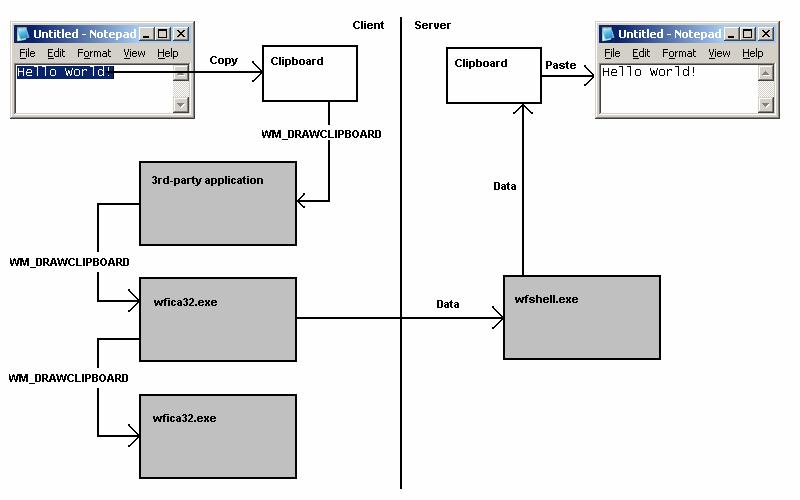
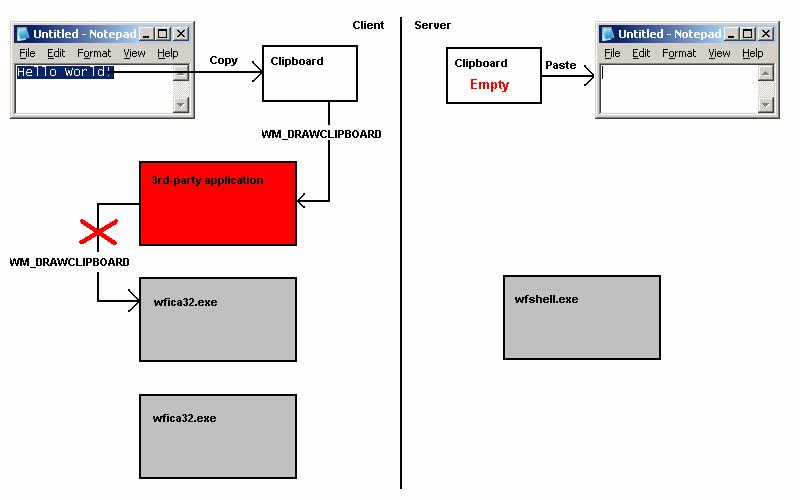
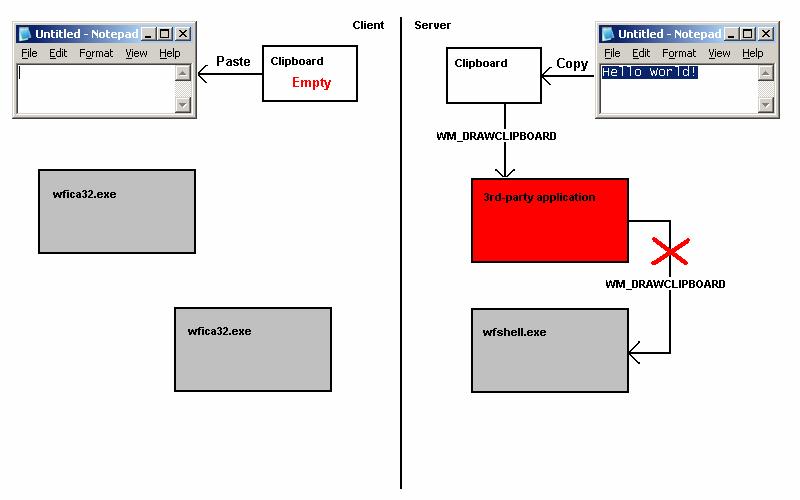
If a 3rd-party application forgets to forward notifications down then we have a broken clipboard chain and clipboard changes are not sent via ICA protocol:
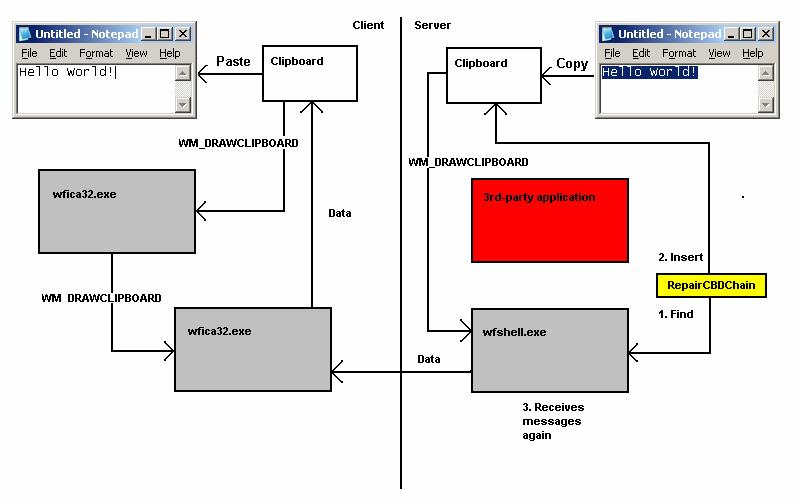
If you run RepairCBDChain.exe it tries to find the window of wfica32.exe and registers it for clipboard notifications again:
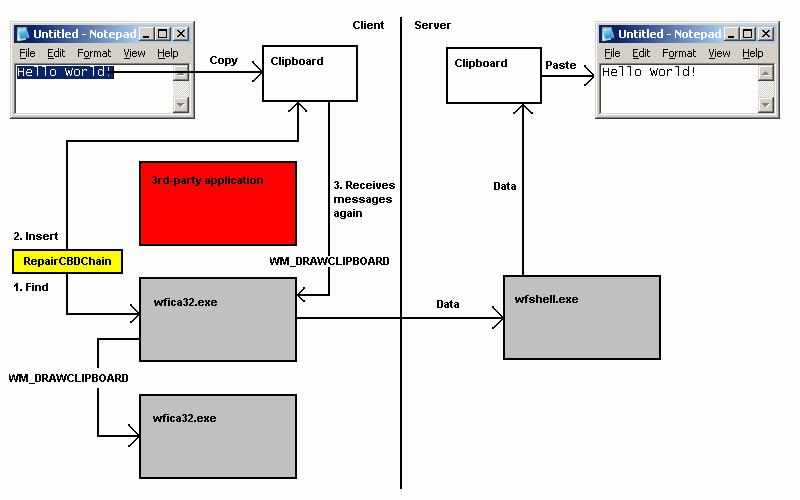
However if it finds the second instance of wfica32.exe (as on the picture above) the first instance will be still cut off from notifications and this explains why RepairCBDChain.exe doesn’t work sometimes.
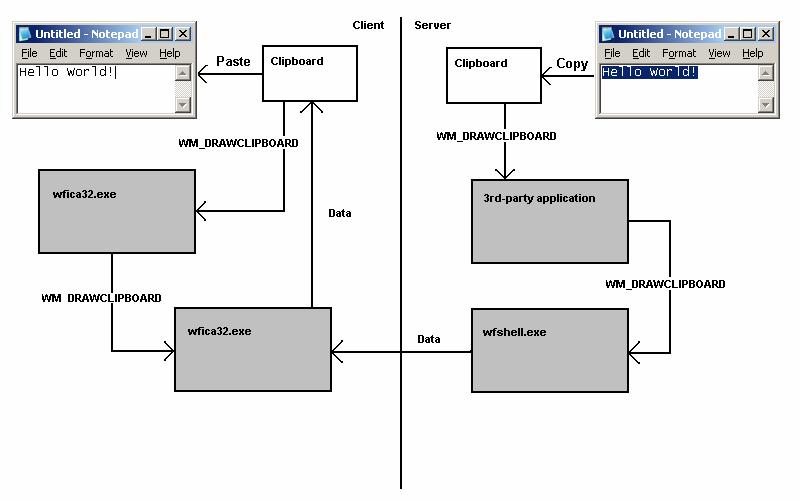
On the server session side the picture is similar (the registered application is wfshell.exe):
You can see WM_DRAWCLIPBOARD messages in MessageHistory logs for wfica32.exe process:
PID.TID: c20.c0c
HWND: 0x002501D4

Class: "wMFService006600CA004"

Title: "Microsoft Outlook7718 - MetaFrame Presentation Server Client [SpeedScreen On]"
HWND: 0x003F08DC

Class: "Transparent Windows Client"

Title: "^P ^b24 of 24 - Clipboard^b^SItem collected. - \\Remote"
HWND: 0x004E0332

Class: "WFClip"

Title: "WFClip"

17:58:53:484 S WM_DRAWCLIPBOARD (0×308) wParam: 0xd0aa0 lParam: 0×0
HWND: 0x0094036E

Class: "TWI Link"

Title: ""
Hope this little excursion explained clipboard chain, how it becomes broken and how it is repaired.
- Dmitry Vostokov -