Archive for the ‘Debugging’ Category

Memory Map Visualization Tools

Friday, July 31st, 2009

Mark Russinovich and Bryce Cogswell published a graphical virtual memory visualization tool: VMMap. Since more and more tools appear I attempted to classify them into 2 major categories or memory views they can provide:

1. Traditional or synthetic memory visualization tools: show derived characteristics, like colors or computed values and graphs, from memory ranges.

2. Natural memory visualization tools: treat memory as a bitmap but can also include image annotations. Image annotation was one of my main interests when I worked at Accusoft (now Accusoft Pegasus) a decade ago. 

- Dmitry Vostokov @ DumpAnalysis.org -

Front Cover for X64 WDPF Book

Wednesday, July 29th, 2009

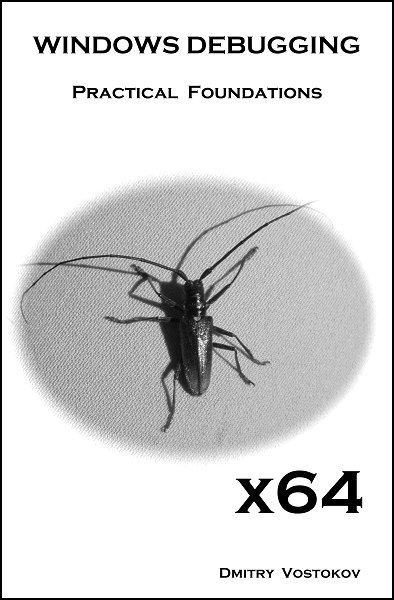
Here is the front cover for the forthcoming book X64 Windows Debugging: Practical Foundations (ISBN: 978-1906717568):

- Dmitry Vostokov @ DumpAnalysis.org -

Trace Analysis Patterns (Part 6)

Wednesday, July 29th, 2009

Often analysis of software traces starts with searching for short textual patterns, like a failure or an exception code or simply the word “exception”. And indeed, some software components are able to record their own exceptions or exceptions that were propagated to them including full stack traces. This is all common in .NET and Java environments. Here is a synthetic and beautified example based on real software traces:

N      PID  TID  Message
[...]
265799 8984 4216 ComponentA.Store.GetData threw exception: ‘System.Reflection.TargetInvocationException: DCOM connection to server failed with error: ‘Exception from HRESULT: 0×842D0001′ —> System.Runtime.InteropServices.COMException (0×842D0001): Exception from HRESULT: 0×842D0001
   at ComponentA.GetData(Byte[] pKey)
   at System.RuntimeMethodHandle._InvokeMethodFast(Object target, Object[] arguments, SignatureStruct& sig, MethodAttributes methodAttributes, RuntimeTypeHandle typeOwner)
   at System.RuntimeMethodHandle.InvokeMethodFast(Object target, Object[] arguments, Signature sig, MethodAttributes methodAttributes, RuntimeTypeHandle typeOwner)
   at System.Reflection.RuntimeMethodInfo.Invoke(Object obj, BindingFlags invokeAttr, Binder binder, Object[] parameters, CultureInfo culture, Boolean skipVisibilityChecks)
   at System.Reflection.RuntimeMethodInfo.Invoke(Object obj, BindingFlags invokeAttr, Binder binder, Object[] parameters, CultureInfo culture)
   at ComponentB.Connections.ComInterfaceProxy.Invoke(IMessage message)’ 
265800 8984 4216 === Begin Exception Dump === 
265801 8984 4216 ComponentB.Exceptions.ConnectionException: DCOM connection to server failed with error: ‘Exception from HRESULT: 0×842D0001′ —> System.Runtime.InteropServices.COMException (0×842D0001): Exception from HRESULT: 0×842D0001
265802 8984 4216 at ComponentA.Store.GetData(Byte[] pKey) 
[…]
265808 8984 4216 Exception rethrown at [0]:
265809 8984 4216 at System.Runtime.Remoting.Proxies.RealProxy.HandleReturnMessage(IMessage reqMsg, IMessage retMsg) 
265810 8984 4216 at System.Runtime.Remoting.Proxies.RealProxy.PrivateInvoke(MessageData& msgData, Int32 type) 
265811 8984 4216 at ComponentA.Store.GetData(Byte[] pKey) 
265812 8984 4216 at ComponentA.App.EnumBusinessObjects()

[…]
265816 8984 4216 ===> InnerException: 
265817 8984 4216 ** COM Exception Error Code: 0×842d0001 
265818 8984 4216 System.Runtime.InteropServices.COMException (0×842D0001): Exception from HRESULT: 0×842D0001 
265819 8984 4216 at ComponentA.Store.GetData(Byte[] pKey) 
265820 8984 4216 === End Exception Dump === 
[…]

In the embedded stack trace we see that App object was trying to enumerate business objects and asked Store object to get some data and the latter object was probably trying to communicate to the real data store via DCOM. The communication attempt failed with HRESULT.

- Dmitry Vostokov @ TraceAnalysis.org -
Epistemic Troubleshooting and Debugging (Part 1)

Sunday, July 26th, 2009

Paraphrasing “Knowing about knowing about knowing” (Side-box 0.1, Consciousness, David Rose) as “Knowing about knowing about problem solving”, I would suggest the following references to raise the level of awareness from meta-troubleshooting and meta-debugging, the subject of various general purpose debugging books to the next epistemic level. I’m currently reading the following books and let you know about my progress along the journey:

Toward a Unified Theory of Problem Solving: Views From the Content Domains

Buy from Amazon

The Psychology of Problem Solving

Buy from Amazon

The Cambridge Handbook of Expertise and Expert Performance

Buy from Amazon

- Dmitry Vostokov @ DumpAnalysis.org -

MDAA V1 is still a debugging bestseller

Saturday, July 25th, 2009

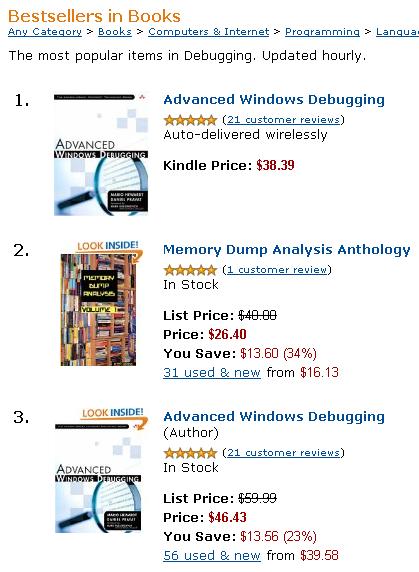
Noticed today that it is still one of the top bestselling debugging books on Amazon:

- Dmitry Vostokov @ DumpAnalysis.org -

Deadlocks in iPhone

Friday, July 24th, 2009

One of the authors of June Debugged! MZ/PE issue, Kapildev Ramlal, published a short article about XCode debugging of multithreaded deadlocks and a few GDB commands:

Episode 1 of XCode iPhone Debugging Adventures

- Dmitry Vostokov @ DumpAnalysis.org -

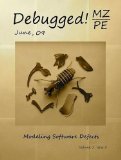
Debugged! MZ/PE June issue is out

Thursday, July 23rd, 2009

Finally the issue is available on Amazon and through other sellers:

Debugged! MZ/PE: Modeling Software Defects

Buy from Amazon

I’m now planning the September issue and post details later. 

- Dmitry Vostokov @ DumpAnalysis.org -

Real-time Memory Visualization System

Thursday, July 23rd, 2009

Jamie Fenton has finally made available for beta testing fantastic memory visualization system HayWire & Barn Burner I use often for mining curious pictures from virtual memory space, like “cosmic rays“. Besides providing artistic pleasure, real-time natural memory visualization can have other applications including visual debugging. Looking forward to seeing more wonders in this area of research!

- Dmitry Vostokov @ DumpAnalysis.org -

Trace Analysis Patterns (Part 5)

Wednesday, July 22nd, 2009

Sometimes we have several disjoint Periodic Errors and possible false positives. We wonder where should we start or assign relative priorities for troubleshooting suggestions. Here Statement Density and Current pattern can help. The statement or message density is simply the ratio of the number of occurrences of the specific trace statement (message) in the trace to the total number of all different recorded messages.

Consider this software trace with two frequent messages:

N     PID  TID
21    5928 8092 LookupAccountSid failed. Result = -2146238462
[...]
1013  5928 1340 SQL execution needs a retry. Result = 0

We have approx. 7,500 statements for the former and approx. 1,250 statements for the latter. The total number of trace statements is 185,700, so we have the corresponding approx. trace densities: 0.04 and 0.0067. Their relative ratio 7,500 / 1,250 is 6.

Another trace for the same problem was collected at a different time with the same errors. It has 71,100 statements and only 160 and 27 statements counted for messages above. We have a ratio 160 / 27 approx. the same, 5.93, that suggests that messages are correlated. However statement density is much lower, 0,002 and 0.00038 approx. and this suggests the closer look at the second trace to see whether these problems started at some time later after the start of the recording.

We can also check the statement current as the number of messages per unit of time. The first trace was recorded over the period of 195 seconds and the second over the period of 650 seconds. Therefore, we have 952 msg/s and 109 msg/s respectively. This suggests that the problem might have started at some time during the second trace or there were more modules selected for the first trace. To make sure, we adjust the total number of messages for these two traces. We find the first occurrence of the error and subtract its message number from the total number of messages. For our first trace we see that messages start from the very beginning, and in our second trace they also almost start from the beginning. So such adjustment shouldn’t give much better results here. Also these statements continue to be recorded till the very end of these traces.

To avoid being lost in this discusssion I repeat main results:

           Density             Relative Density   Current,
                                                  all msg/s
Trace 1    0.04 / 0.0067       6                  952
Trace 2    0.002 / 0.00038     5.93               109

The possibility that much more was traced that resulted in lower density for the second trace should be discarded because we have much lower current. Perhaps environment was not quite the same for the second tracing. However the same relative density for two different errors suggest that they are correlated and the higher density of the first error suggests that we should start our investigation from it.

The reason why I came up with this statistical trace analysis pattern is because 2 different engineers analyzed the same trace and both were suggesting different troubleshooting paths based on selected error messages from software traces. So I did a statistical analysis to prioritize their suggestions.

- Dmitry Vostokov @ TraceAnalysis.org -

Hot-Chopped MDAA Volumes

Tuesday, July 21st, 2009

Found today on Amazon that one seller sells cheap chopped copies of Memory Dump Analysis Anthology:

“The LOWEST PRICE because the spine binding & glue has been CHOPPED OFF; the binding is MISSING; this makes the loose pages suitable for photocopying or for hole punching to place into a 3-ring notebook. The pages have no marks or highlights. I also have Volume 2 with a cut spine for cheap.”

The seller has been contacted to stop this advertisement because the page number 2 in both volumes says:

You must not circulate this book in any other binding or cover and you must impose the same condition on any acquirer.

There is also the standard clause about reproduction and storage.

- Dmitry Vostokov @ DumpAnalysis.org -

Realtime Reading of Windows Internals

Friday, July 17th, 2009

I resumed this week my reading notebook on Software Generalist blog with a top priority book to read every working day: Windows Internals, 5th edition. In reading notes I put what I find interesting for me (at this time) or related to Windows memory dump analysis or debugging and troubleshooting in general. For the latter case, sometimes I put additional references or even WinDbg examples from user, kernel and complete memory dumps in full color. Hope you find these notes useful too.

- Dmitry Vostokov @ DumpAnalysis.org -

On Space and Mode

Friday, July 17th, 2009

Sometimes I see engineers use memory “space” and protection “mode” terms interchangeably although, in my opinion, there is a big difference between them. They are independent from each other (orthogonal). For example, a thread may access a user space address but be running in a kernel protected mode. Even it is possible to call a user space function from a kernel space thread (that function shouldn’t try to call Windows API). The following combinations are possible:

user space / user mode
kernel space / kernel mode
user space / kernel mode

Most of the time space and mode coincide (blue - user, red - kernel):

ChildEBP RetAddr 
b6046c50 80833e95 nt!KiSwapContext+0×26
b6046c7c 8082b72b nt!KiSwapThread+0×2e5
b6046cc4 808ef652 nt!KeRemoveQueue+0×417
b6046d48 8088b19c nt!NtRemoveIoCompletion+0xdc
b6046d48 7c94860c nt!KiFastCallEntry+0xfc
00bfff70 7c9477f9 ntdll!KiFastSystemCallRet
00bfff74 7c959f68 ntdll!NtRemoveIoCompletion+0xc
00bfffb8 7c82482f ntdll!RtlpWorkerThread+0×3d
00bfffec 00000000 kernel32!BaseThreadStart+0×34

I personally prefer to talk about ”spaces” when I analyze complete memory dumps and almost never talk about “modes”. 

- Dmitry Vostokov @ DumpAnalysis.org -

On Self Dumps of Secure String API

Tuesday, July 14th, 2009

Sometimes we get crashes with the following stack trace pattern:

0:000> kv 100
ChildEBP RetAddr  Args to Child             
0012cecc 7c91df4a 7c8094fe 00000002 0012cef8 ntdll!KiFastSystemCallRet
0012ced0 7c8094fe 00000002 0012cef8 00000001 ntdll!ZwWaitForMultipleObjects+0xc
0012cf6c 7c80a085 00000002 0012d09c 00000000 kernel32!WaitForMultipleObjectsEx+0x12c
0012cf88 6990763c 00000002 0012d09c 00000000 kernel32!WaitForMultipleObjects+0x18
0012d91c 699082b1 0012f090 00000001 00198312 faultrep!StartDWException+0×5df
0012e990 7c8635d1 0012f090 00000001 00000000 faultrep!ReportFault+0×533
0012f030 78138a09 0012f090 00000022 c000000d kernel32!UnhandledExceptionFilter+0×587
0012f368 781443d1 00000000 00000000 00000000 msvcr80!_invoke_watson+0xc4

0012f38c 0040b02f 0012f538 00000104 004f80a0 msvcr80!strcat_s+0×29
WARNING: Stack unwind information not available. Following frames may be wrong.
0012f39c 0012f538 00000104 00430848 0012f538 Application+0xb020

0:000> .exptr 0012f090

----- Exception record at 0012f040:
ExceptionAddress: 781443d1 (msvcr80!strcat_s+0x00000029)
   ExceptionCode: c000000d
  ExceptionFlags: 00000000
NumberParameters: 0

----- Context record at 0012f098:
eax=f2c4dacf ebx=00000000 ecx=00000002 edx=7c91e514 esi=00000022 edi=00000000
eip=781443d1 esp=0012f36c ebp=004f7658 iopl=0 nv up ei ng nz na pe nc
cs=001b ss=0023 ds=0023 es=0023 fs=003b gs=0000 efl=00000286
msvcr80!strcat_s+0x29:
781443d1 83c414          add     esp,14h

0:000> !error c000000d
Error code: (NTSTATUS) 0xc000000d (3221225485) - An invalid parameter was passed to a service or function.

We clearly see that the crash involved strcat_s but we don’t see any invalid instruction or access violation call. The ADD instruction is perfectly valid above. However, if we disassemble EIP backwards we would see the call to _invalid_parameter function and it looks like it has a name association with Dr. Watson:

0:000> ub 781443d1
msvcr80!strcat_s+0×1c:
781443c4 5e              pop     esi
781443c5 8930            mov     dword ptr [eax],esi
781443c7 53              push    ebx
781443c8 53              push    ebx
781443c9 53              push    ebx
781443ca 53              push    ebx
781443cb 53              push    ebx
781443cc e89f46ffff      call    msvcr80!_invalid_parameter (78138a70)

0:000> uf 78138a70
Flow analysis was incomplete, some code may be missing
msvcr80!_invoke_watson:
78138945 55              push    ebp
78138946 8dac2458fdffff  lea     ebp,[esp-2A8h]
7813894d 81ec28030000    sub     esp,328h

[...]

msvcr80!_invalid_parameter:
78138a70 55              push    ebp
78138a71 8bec            mov     ebp,esp
78138a73 ff3528401c78    push    dword ptr [msvcr80!__pInvalidArgHandler (781c4028)]
78138a79 e85ba1ffff      call    msvcr80!_decode_pointer (78132bd9)
78138a7e 85c0            test    eax,eax
78138a80 59              pop     ecx
78138a81 7403            je      msvcr80!_invalid_parameter+0×16 (78138a86)

msvcr80!_invalid_parameter+0x13:
78138a83 5d              pop     ebp
78138a84 ffe0            jmp     eax

msvcr80!_invalid_parameter+0x16:
78138a86 6a02            push    2
78138a88 e806330000      call    msvcr80!_crt_debugger_hook (7813bd93)
78138a8d 59              pop     ecx
78138a8e 5d              pop     ebp
78138a8f e9b1feffff      jmp     msvcr80!_invoke_watson (78138945)

According to MSDN documentation, _s secure functions by default use a postmortem debugger mechanism:

Secure-enhanced CRT parameter validation

So we have something that is similar to Self-Dump pattern here. The same parameter checking is seen in the case of C++ STL exceptions. In case of custom unhandled exception filters not resorting to WER faulrep.dll other stacks can show process termination, for example, with wcscpy_s:

0:000> kL 100
ChildEBP RetAddr 
0111cb64 7c947c39 ntdll!KiFastSystemCallRet
0111cb68 7c80202b ntdll!ZwTerminateProcess+0xc
0111cb78 78138a2b kernel32!TerminateProcess+0×20
0111ceb4 78144ba1 MSVCR80!_invoke_watson+0xe6

0111ced8 67dbb47d MSVCR80!wcscpy_s+0×29
0111cf00 67dbc93b Application!CopyName+0×5d
[…]

Here the specified size of the destination buffer was smaller than the size of source NULL-terminated strings, which was a good thing anyway: old strcpy or strcat function would definitely caused buffer overflow effects. Now we have a nice side effect too, the dump is saved, ready for a postmortem analysis and subsequent code improvement.

- Dmitry Vostokov @ DumpAnalysis.org -

Bug Set Fire

Tuesday, July 14th, 2009

Following the news about Dr. Debugalov, Giordano Bruno1 of Debugging, his creator, Narasimha Vedala, depicted the event at once:

2009-07-03-Debugalov-Burnt from Narasimha Vedala

This event was also filmed by Narasimha Vedala:

Burning Debugalov (3Mb AVI)

1. Giordano Bruno wrote extensive works on the art of memory and Dr. Debugalov is famous for his memory analysis techniques.

- Dmitry Vostokov @ DumpAnalysis.org -

Music for Debugging: THE ALL MIGHTY DEBUGGER

Monday, July 13th, 2009

Just finished listening twice to Rick Wakeman performance at Lincoln Cathedral. To paraphrase his words, when I do memory dump analysis I experience the feeling of power surge through the fingers. Highly recommended to get the feeling of being the debugging god back during bitter moments of software support:

At Lincoln Cathedral

Buy from Amazon

Here is my version of track titles inspired by listening (with my comments in italics):

1. Process Mortality
2. Dance of the MIPS
3. Gifts from Help
4. THE ALL MIGHTY DEBUGGER
5. Problem solved
6. The DA TA Variations (remember DATA: Dump Analysis Trace Analysis)

- Dmitry Vostokov @ DumpAnalysis.org -

Fiber Bundle of Memory Space

Sunday, July 12th, 2009

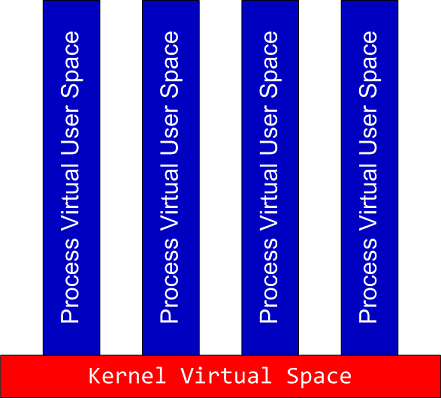
When complete memory dumps are huge (in case of x64 systems) we can dump specific processes and then force a kernel memory dump. Here we have a product of spaces similar to a fiber bundle illustrated by the following intuitive picture:

- Dmitry Vostokov @ DumpAnalysis.org -

Forthcoming Debugged! MZ/PE June issue

Sunday, July 12th, 2009

The second issue of the magazine was put into production today and should be available after one or two weeks on Amazon, B&N and other booksellers worldwide.

Title: Debugged! MZ/PE: Modeling Software Defects
Authors: Konstantin Chebotarev, Kapildev Ramlal, Dmitry Vostokov
ISBN: 1906717680
ISBN-13: 978-1906717681
Annotation: Welcome to the second issue of Debugged! MZ/PE magazine! It brings fault injection into new light and features articles discussing software defect construction via DLL injection, modeling CPU spikes and runaway exception processing. This issue also includes a memory dump analysis certification voucher. Back cover features WinDbg breakpoint and tracing command summary for easy desk reference. - Dmitry Vostokov - Editor-in-Chief

- Dmitry Vostokov @ DumpAnalysis.org -

Full page heap settings on x64 Windows

Wednesday, July 8th, 2009

If we want to use gflags.exe to enable page heap settings (or any other image file execution options) for a 32-bit executable running on x64 Windows we should use 32-bit version of gflags.exe from 32-bit Debugging Tools for Windows (see windbg.org for quick download links) or if we want to set appropriate registry key manually we should use Wow6432Node branch:

HKEY_LOCAL_MACHINE\SOFTWARE\Wow6432Node\Microsoft\Windows NT\CurrentVersion\Image File Execution Options\<process name with .exe extension>

Name: GlobalFlag
Type: REG_DWORD
Value: 0x02000000

Name: PageHeapFlags
Type: REG_DWORD
Value: 0x00000003

- Dmitry Vostokov @ DumpAnalysis.org -

Raw Stack Dump of WOW64 Process

Tuesday, July 7th, 2009

Sometimes we need to dump raw stack data of the given thread to get correct function arguments or to see execution residue. If the process is WOW64 (32-bit running on x64 Windows) and its memory dump was saved using a 64-bit debugger or a process dumper like userdump.exe we have 2 stacks in it:

64-bit stack:

0:007> k
Child-SP          RetAddr           Call Site
00000000`030fee38 00000000`75fcab46 wow64cpu!WaitForMultipleObjects32+0x3a
00000000`030feee0 00000000`75fca14c wow64!RunCpuSimulation+0xa
00000000`030fef10 00000000`77d373db wow64!Wow64LdrpInitialize+0x4b4
00000000`030ff470 00000000`77cf85ce ntdll! ?? ::FNODOBFM::`string'+0x20061
00000000`030ff520 00000000`00000000 ntdll!LdrInitializeThunk+0xe

0:007> r
rax=0000000000000000 rbx=0000000000000002 rcx=0000000000000400
rdx=0000000000000000 rsi=0000000000000000 rdi=0000000000000000
rip=0000000075ec374f rsp=00000000030fee38 rbp=0000000005baef38
 r8=000000000000002b  r9=0000000077e9057a r10=0000000000000000
r11=00000000030fee30 r12=000000007efad000 r13=00000000030ffd20
r14=00000000030fee70 r15=0000000075ec3380
iopl=0 nv up ei pl nz ac pe nc
cs=0033 ss=002b ds=002b es=002b fs=0053 gs=002b efl=00000212
wow64cpu!WaitForMultipleObjects32+0×3a:
00000000`75ec374f 418bbda0000000  mov     edi,dword ptr [r13+0A0h] ds:00000000`030ffdc0=00000000

0:007> !teb
Wow64 TEB32 at 000000007efaf000

error InitTypeRead( wow64!_TEB32 )...

Wow64 TEB at 000000007efad000
    ExceptionList:        000000007efaf000
    StackBase:            00000000030ffd20
    StackLimit:           00000000030f8000

    SubSystemTib:         0000000000000000
    FiberData:            0000000000001e00
    ArbitraryUserPointer: 0000000000000000
    Self:                 000000007efad000
    EnvironmentPointer:   0000000000000000
    ClientId:             0000000000000b44 . 0000000000000b1c
    RpcHandle:            0000000000000000
    Tls Storage:          0000000000000000
    PEB Address:          000000007efdf000
    LastErrorValue:       0
    LastStatusValue:      c0000034
    Count Owned Locks:    0
    HardErrorMode:        0

32-bit stack:

0:007> .effmach x86
Effective machine: x86 compatible (x86)

0:007:x86> k
ChildEBP RetAddr 
05baee9c 7756e91a ntdll_77e70000!NtWaitForMultipleObjects+0x15
05baef38 775649d9 kernel32!WaitForMultipleObjectsEx+0x11d
05baef54 7761573d kernel32!WaitForMultipleObjects+0x18
05baefc0 77615969 kernel32!WerpReportFaultInternal+0x16d
05baefd4 775ec66f kernel32!WerpReportFault+0x70
05baf060 77eed03e kernel32!UnhandledExceptionFilter+0x1b5
05baf068 77ebf2d0 ntdll_77e70000!__RtlUserThreadStart+0x6f
05baf07c 77f229b3 ntdll_77e70000!_EH4_CallFilterFunc+0x12
05baf0a4 77e93099 ntdll_77e70000!_except_handler4+0x8e
05baf0c8 77e9306b ntdll_77e70000!ExecuteHandler2+0x26
05baf178 77e92eff ntdll_77e70000!ExecuteHandler+0x24
05baf198 7757f328 ntdll_77e70000!KiUserExceptionDispatcher+0xf
05baf4fc 7155dead kernel32!RaiseException+0x58
WARNING: Stack unwind information not available. Following frames may be wrong.
05baf534 7155a59d ComponentA!DllUnregisterServer+0x1adbe0
[...]

0:007:x86> r
eax=00000000 ebx=00000002 ecx=00000003 edx=00000000 esi=00000000 edi=00000000
eip=77e90bc5 esp=05baeea0 ebp=05baef38 iopl=0 nv up ei pl nz na pe nc
cs=0023 ss=002b ds=002b es=002b fs=0053 gs=002b efl=00000206
ntdll_77e70000!NtWaitForMultipleObjects+0×15:
77e90bc5 c21400          ret     14h

Unfortunately there is an error when try to get its TEB (TEB32) using !teb command so we can either use dp command to discover stack base and limit:

0:007:x86> !teb
Wow64 TEB32 at 000000007efaf000

error InitTypeRead( wow64!_TEB32 )…

0:007:x86> dp 000000007efaf000 l3
7efaf000  05baef28 05bb0000 05b95000

or use WOW64 extension for this purpose:

0:007:x86> !wow64exts.info

PEB32: 0x7efde000
PEB64: 0x7efdf000

Wow64 information for current thread:

TEB32: 0×7efaf000
TEB64: 0×7efad000

32 bit, StackBase   : 0×5bb0000
        StackLimit  : 0×5b95000

        Deallocation: 0×5ab0000

64 bit, StackBase   : 0x30ffd20
        StackLimit  : 0x30f8000
        Deallocation: 0x30c0000
Wow64 TLS slots:

WOW64_TLS_STACKPTR64:       0x0000000000000000
WOW64_TLS_CPURESERVED:      0x00000000030ffd20
WOW64_TLS_INCPUSIMULATION:  0x0000000000000000
WOW64_TLS_LOCALTHREADHEAP:  0x0000000000000000
WOW64_TLS_EXCEPTIONADDR:    0x000000007757f328
WOW64_TLS_USERCALLBACKDATA: 0x0000000000000000
WOW64_TLS_EXTENDED_FLOAT:   0x0000000000000000
WOW64_TLS_APCLIST:          0x0000000000000000
WOW64_TLS_FILESYSREDIR:     0x0000000000000000
WOW64_TLS_LASTWOWCALL:      0x0000000000000000
WOW64_TLS_WOW64INFO:        0x000000007efde238

In case these methods don’t work and we want to quickly inspect raw memory around the current ESP value we can still use dps esp-xxx esp+xxx command, where xxx is some offset:

0:007:x86> dps esp-10 esp+10
05baee90  00000000
05baee94  00000000
05baee98  00000000
05baee9c  77e90bc5 ntdll_77e70000!NtWaitForMultipleObjects+0x15
05baeea0  7756e91a kernel32!WaitForMultipleObjectsEx+0x11d
05baeea4  00000002
05baeea8  05baeeec
05baeeac  00000001
05baeeb0  00000000

Remember that dp and dps are better to use here than dd, dds or dq, dqs: they automatically take into account the pointer size, 32-bit in x86 mode and 64-bit in native mode:

0:007:x86> .effmach amd64
Effective machine: x64 (AMD64)

0:007> dps esp-10 esp+10
00000000`030fee28  00000000`006d0008
00000000`030fee30  00000000`030ffd20
00000000`030fee38  00000000`7efad000
00000000`030fee40  00000000`00003da8
00000000`030fee48  00000000`75ec3688 wow64cpu!ServiceNoTurbo+0x28

- Dmitry Vostokov @ DumpAnalysis.org -

Dictionary of Debugging: Memory Dump

Saturday, July 4th, 2009

Memory Dump

A snapshot of memory. Can be sequential (cell by cell) or selective.

References: Memory Dump - A Mathematical Definition

Synonyms: crash dump, core dump.

Antonyms:

Also: user dump, kernel dump, complete dump, full dump, minidump.

- Dmitry Vostokov @ DumpAnalysis.org -