Archive for June, 2010

Freedom (Debugging Slang, Part 11)

Thursday, June 10th, 2010

Freedom - Free•dom, a domain, realm, territory of memory allocation errors and bugs.

Examples: This process finally experienced the complete freedom! Never loose your freedom: it keeps you employed. “Freedom, run away … / That freedom sun / Will shine someday” (popular lyrics).

- Dmitry Vostokov @ DumpAnalysis.org + TraceAnalysis.org -

Trace Analysis Patterns (Part 25)

Tuesday, June 8th, 2010

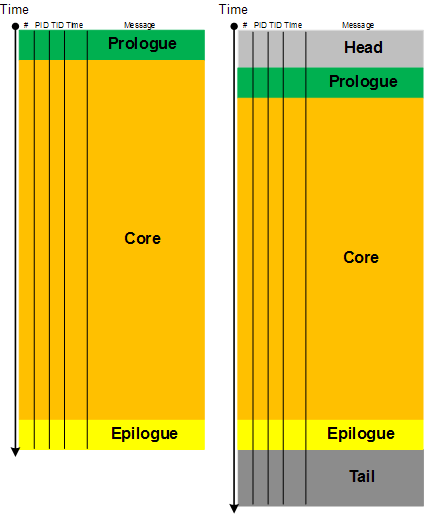
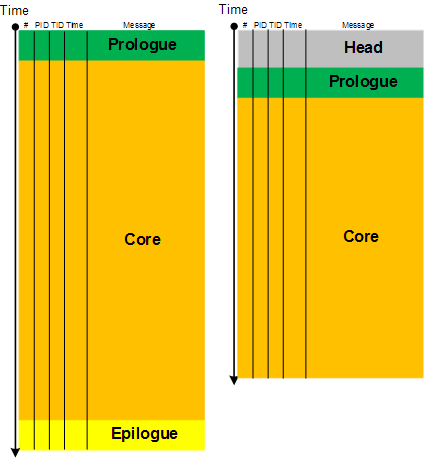
Here we introduce a software narratological partitioning of a trace into Head, Prologue, Core, Epilogue and Tail segments. This is useful for comparative software trace analysis. Suppose, a trace started just before the reproduction steps or a start marker was injected (by CDFMarker, for example) and finished just after the last repro steps or after an end marker was injected. Then its core trace messages are surrounded by prologue and epilogue statements. What is before and after are not necessary for analysis and usually distract an analyst. They are shown as grey areas on the following picture where the left trace is for working (non-working) scenario and the right trace is for non-working (working) scenario:

The size of a core segment need not be the same because environments and executed code paths might be different. However, often some traces are truncated (another pattern). Also sometimes it is difficult to establish whether the first trace is normal and the second has a tail or the first one is truncated and the second one is normal with an optional tail. Here artificial markers are important.

- Dmitry Vostokov @ DumpAnalysis.org + TraceAnalysis.org -

IRP distribution anomaly, inconsistent dump, execution residue, hardware activity, coincidental symbolic information, not my version, virtualized system: pattern cooperation

Monday, June 7th, 2010

It was reported that a system had an abnormally high number of interrupt activity visible in various monitoring tools. A complete memory dump was collected. When we open it and look at an IRP list we find statistically higher number of IRPs belonging to Disk and DriverA device drivers:

0: kd> !irpfind
Irp [ Thread ] irpStack: (Mj,Mn) DevObj [Driver] MDL Process
[…]
8a3d3008 [8b56cb10] irpStack: ( 4,34) 8b1b8030 [ \Driver\Disk] 0×00000000
8a3d3340 [8acab888] irpStack: ( 3, 0) 8b4c6030 [ \FileSystem\Npfs]
8a3d4580 [8b56cb10] irpStack: ( 4,34) 8b1b8030 [ \Driver\Disk] 0×00000000
8a403e00 [8b56cb10] irpStack: ( 4,34) 8b1b8030 [ \Driver\Disk] 0×00000000
8a4047e0 [8b56cb10] irpStack: ( 4,34) 8b1b8030 [ \Driver\Disk] 0×00000000
[…]
8aa6ab28 [00000000] irpStack: ( f, 0) 8b192030 [ \Driver\DriverA] 0×00000000
8aa6ce28 [00000000] irpStack: ( f, 0) 8b192030 [ \Driver\DriverA] 0×00000000
[…]

What we also notice is that the thread 8b56cb10 is also an active running thread so we look at its raw stack to find any executon residue providing hints to possible hardware activity.

0: kd> !stacks
Proc.Thread  .Thread  Ticks   ThreadState Blocker
                            [8b57f7a8 System]
   4.000070  8b579db0 ffffff42 Blocked    +0x1
   4.0000c0  8b5768d0 ffffff42 READY      nt!KiAdjustQuantumThread+0x109
   4.0000e4  8b56cb10 ffffff42 RUNNING    +0xf6fb2044
[…]

0: kd> !thread 8b56cb10
THREAD 8b56cb10  Cid 0004.00e4  Teb: 00000000 Win32Thread: 00000000 RUNNING on processor 0
Not impersonating
DeviceMap                 e10018b8
Owning Process            8b57f7a8       Image:         System
Attached Process          N/A            Image:         N/A
Wait Start TickCount      24437735    
Context Switch Count      33644            
UserTime                  00:00:00.000
KernelTime                00:00:07.843
Start Address nt!MiMappedPageWriter (0x80847ffe)
Stack Init f70c4000 Current f70c3468 Base f70c4000 Limit f70c1000 Call 0
Priority 17 BasePriority 8 PriorityDecrement 0
ChildEBP RetAddr  Args to Child             
f70c3470 00000000 000000be e1912bc0 e1912bc4 0xf6fb2044

However, WinDbg reports another current thread running on the same processor so we obviously have an inconsistent dump and should exercise caution:

0: kd> !thread
THREAD 8089d8c0  Cid 0000.0000  Teb: 00000000 Win32Thread: 00000000 RUNNING on processor 0
Not impersonating
Owning Process            8089db40       Image:         Idle
Attached Process          N/A            Image:         N/A
Wait Start TickCount      24437476       Ticks: 69 (0:00:00:01.078)
Context Switch Count      72194391            
UserTime                  00:00:00.000
KernelTime                4 Days 08:57:56.171
Stack Init 8089a8b0 Current 8089a5fc Base 8089a8b0 Limit 808978b0 Call 0
Priority 0 BasePriority 0 PriorityDecrement 0
ChildEBP RetAddr  Args to Child             
f3b30c5c 00000000 00000000 00000000 00000000 LiveKdD+0×1c07

0: kd> !running
[...]
Prcbs  Current   Next   
  0    ffdff120  8089d8c0            …………….
  1    f772f120  f7732090            …………….

0: kd> !thread f7732090
THREAD f7732090  Cid 0000.0000  Teb: 00000000 Win32Thread: 00000000 RUNNING on processor 1
Not impersonating
Owning Process            8089db40       Image:         Idle
Attached Process          N/A            Image:         N/A
Wait Start TickCount      0              Ticks: 24437545 (4:10:03:56.640)
Context Switch Count      75624870            
UserTime                  00:00:00.000
KernelTime                4 Days 08:56:05.125
Stack Init f78b3000 Current f78b2d4c Base f78b3000 Limit f78b0000 Call 0
Priority 0 BasePriority 0 PriorityDecrement 0
ChildEBP RetAddr  Args to Child             
f3b30c5c 00000000 00000000 00000000 00000000 LiveKdD+0×1c07

Let’s come back to the thread 8b56cb10. Its raw stack residue shows traces of SCSI activity:

0: kd> dps f70c1000 f70c4000
[...]
f70c2f38  8b20100c
f70c2f3c  f70c2f9c
f70c2f40  f72922a5 DriverA!BuildScatterGather+0×9b
f70c2f44  8b20100c
f70c2f48  8aa24dfc
[…]
f70c337c  00000000
f70c3380  00000246
f70c3384  808a6228 nt!KiProcessorBlock+0×8
f70c3388  00000002
f70c338c  00000011
f70c3390  00000246
f70c3394  f70c33a4
f70c3398  80a62a73 hal!HalRequestIpi+0×13
f70c339c  00000002
f70c33a0  000000e1
f70c33a4  f70c33dc
f70c33a8  8082e4db nt!KiIpiSend+0×27
f70c33ac  00000002
f70c33b0  f772fa7c
f70c33b4  8b56bdb0
f70c33b8  ffdff120
f70c33bc  00000000
f70c33c0  00000002
f70c33c4  00000001
f70c33c8  00000000
f70c33cc  00000002
f70c33d0  00000002
f70c33d4  f70c33e4
f70c33d8  80a61456 hal!KfLowerIrql+0×62
f70c33dc  00000001
f70c33e0  00000002
f70c33e4  f70c3494
f70c33e8  f70c3450
f70c33ec  8b56cb10
f70c33f0  8b089100
f70c33f4  8a5abe01
f70c33f8  f70c3450
f70c33fc  8b089100
f70c3400  8a5abe01
f70c3404  8b089101
f70c3408  f70c3418
f70c340c  80a61456 hal!KfLowerIrql+0×62
f70c3410  8a5abe98
f70c3414  8b089101
f70c3418  f70c3450
f70c341c  f70c3434
f70c3420  80819c10 nt!FsFilterPerformCompletionCallbacks+0×2e
f70c3424  f70c3450
f70c3428  00000000
f70c342c  00000000
f70c3430  00000000
f70c3434  f70c3584
f70c3438  f70c3584
f70c343c  80815040 nt!FsRtlReleaseFileForModWrite+0×190
f70c3440  f70c3450
f70c3444  8b56cdc4
f70c3448  00010000
f70c344c  8b56cd68
f70c3450  00000024
f70c3454  8b56cbfc
f70c3458  8abe10f0
f70c345c  8a5b4830
f70c3460  8b089100
f70c3464  80a613f4 hal!KfLowerIrql
f70c3468  00000001
f70c346c  00000246
f70c3470  f6fb2044
f70c3474  00000000
f70c3478  000000be
f70c347c  e1912bc0
f70c3480  e1912bc4
f70c3484  8a4b7db8
f70c3488  00000011
f70c348c  f70c34a4
f70c3490  8081610e nt!FsRtlLookupBaseMcbEntry+0×16
f70c3494  80887b75 nt!KiFlushTargetSingleTb+0xd
f70c3498  f70c34d0
f70c349c  8082e431 nt!KiIpiServiceRoutine+0×4d
f70c34a0  f772f121
f70c34a4  00000000
f70c34a8  e2894000
f70c34ac  00000000
f70c34b0  80872322 nt!WRITE_REGISTER_ULONG+0xa
f70c34b4  8b20100c
f70c34b8  80a6157e hal!HalEndSystemInterrupt+0×6e
f70c34bc  8b20100c
f70c34c0  f70c34d0
f70c34c4  80a5e902 hal!HalpIpiHandler+0xd2
f70c34c8  80816209 nt!FsRtlLookupLargeMcbEntry+0×4d
f70c34cc  000000e1
f70c34d0  f70c3564
f70c34d4  80872322 nt!WRITE_REGISTER_ULONG+0xa
f70c34d8  badb0d00
f70c34dc  f6fb2040
f70c34e0  8b20100c
f70c34e4  8b038fb4
f70c34e8  0000f000
f70c34ec  f70c3510
f70c34f0  8b377e10
f70c34f4  8b20100c
f70c34f8  8b038fb4
f70c34fc  00000000
f70c3500  00000000
f70c3504  8b377e64
f70c3508  00000007
f70c350c  f6fb2040
f70c3510  8b201100
f70c3514  0b377e10
f70c3518  00000005
f70c351c  ffdff120
f70c3520  ffdffa40
f70c3524  8b4eca09
f70c3528  8b20100c
f70c352c  ffdffa40
f70c3530  8b4eca09
f70c3534  ffdffa09
f70c3538  f70c3548
f70c353c  80a61456 hal!KfLowerIrql+0×62
f70c3540  8b4ecab4
f70c3544  ffdffa09
f70c3548  f70c356c
f70c354c  80829f70 nt!KeInsertQueueDpc+0×1c4
f70c3550  8b4ecaf8
f70c3554  8b038fb4
f70c3558  8b192001
f70c355c  ffdffa48
f70c3560  ffdff120
f70c3564  00000000
f70c3568  01092855
f70c356c  f70c3580
f70c3570  f727221d SCSIPORT!SpRequestCompletionDpc+0×2d
f70c3574  014ecab4
f70c3578  8b4ecab8
f70c357c  8b4ecaf8
f70c3580  8b4ecbf8
f70c3584  00000102
f70c3588  8b4eca40
f70c358c  8b4ecaf8
f70c3590  8b4ecbf8
f70c3594  8b038f02
f70c3598  f70c35a8
f70c359c  8b4ecbf8
f70c35a0  8b038f02
f70c35a4  8b4ecb02
f70c35a8  f70c35b8
f70c35ac  80a61456 hal!KfLowerIrql+0×62
f70c35b0  8b038f02
f70c35b4  8b4ecb02
f70c35b8  f70c35d8
f70c35bc  80a5f44b hal!KfReleaseSpinLock+0xb
f70c35c0  f72737ae SCSIPORT!SpReceiveScatterGather+0×33b
f70c35c4  8b56bb94
f70c35c8  00000000
f70c35cc  0cd8e000
f70c35d0  0000000f
f70c35d4  0000000f
f70c35d8  f70c3604
f70c35dc  80a60147 hal!HalBuildScatterGatherList+0×1c7
f70c35e0  8b4eca40
f70c35e4  8a5acd20
f70c35e8  8ab7aa98
f70c35ec  8ab7aa30
f70c35f0  8a5acd20
f70c35f4  8b4ecaf8
f70c35f8  8b038fb4
f70c35fc  00804001
f70c3600  00000000
f70c3604  f70c3650
f70c3608  f72733a6 SCSIPORT!ScsiPortStartIo+0×36a
f70c360c  8ab7aa98
f70c3610  8b4eca40
f70c3614  8b56bb38
f70c3618  00000000
f70c361c  00010000
f70c3620  f72736b4 SCSIPORT!SpReceiveScatterGather
f70c3624  8ab7aa30
f70c3628  00000000
f70c362c  8b4eca40
f70c3630  8a5acd20
f70c3634  00000002
f70c3638  8b4eca40
f70c363c  f70c39e0
f70c3640  f70c3658
f70c3644  00000000
f70c3648  80a611ae hal!HalpDispatchSoftwareInterrupt+0×5e
f70c364c  00000000
f70c3650  8a5acd00
f70c3654  00000202
f70c3658  f70c3674
f70c365c  80a613d9 hal!HalpCheckForSoftwareInterrupt+0×81
f70c3660  8b4ecb02
f70c3664  00000000
f70c3668  8b1920e8
f70c366c  8a5acd00
f70c3670  8b4ecb02
f70c3674  f70c3684
f70c3678  80a61456 hal!KfLowerIrql+0×62
f70c367c  8a5acd20
f70c3680  8b4ecb00
f70c3684  f70c36a8
f70c3688  f7273638 SCSIPORT!ScsiPortFdoDispatch+0×279
f70c368c  8b4ecaf8
f70c3690  8b41a228
f70c3694  8a5acd20
f70c3698  f70c36d0
f70c369c  f70c36ac
f70c36a0  8ab7aa30
f70c36a4  8b1920e8
f70c36a8  f70c36c4
f70c36ac  f7273146 SCSIPORT!SpDispatchRequest+0×68
f70c36b0  8b4eca40
f70c36b4  005acdb4
f70c36b8  8b038fb4
f70c36bc  8b1920e8
f70c36c0  8a5acd20
f70c36c4  f70c36e0
f70c36c8  f7272dc3 SCSIPORT!ScsiPortPdoScsi+0×129
f70c36cc  8b1920e8
f70c36d0  8a5acd20
f70c36d4  8a581008
f70c36d8  8a5acd20
f70c36dc  8b192030
f70c36e0  f70c36f4
f70c36e4  f7272299 SCSIPORT!ScsiPortGlobalDispatch+0×1d
f70c36e8  8b192030
f70c36ec  8a5acd20
f70c36f0  8b5441c8
f70c36f4  f70c3708
f70c36f8  8081df85 nt!IofCallDriver+0×45
f70c36fc  8b192030
f70c3700  8a5acd20
f70c3704  8b038f08
f70c3708  f70c3718
f70c370c  f725f607 CLASSPNP!SubmitTransferPacket+0xbb
f70c3710  8b038f08
f70c3714  00000000
f70c3718  f70c374c
f70c371c  f725f2b2 CLASSPNP!ServiceTransferRequest+0×1e4
f70c3720  8b038f08
f70c3724  8b1b80e8
f70c3728  8a581150
f70c372c  8a581008
f70c3730  24052000
f70c3734  00000001
f70c3738  00000001
f70c373c  00011000
f70c3740  00010000
f70c3744  00000000
f70c3748  00000001
f70c374c  f70c3770
f70c3750  f725f533 CLASSPNP!ClassReadWrite+0×159
f70c3754  00000103
f70c3758  00000000
f70c375c  8a581008
f70c3760  8b57e218
f70c3764  8b055790
f70c3768  8b192030
f70c376c  00010000
f70c3770  f70c3784
f70c3774  8081df85 nt!IofCallDriver+0×45
f70c3778  8b1b8030
f70c377c  00000103
f70c3780  8b51d1c8
f70c3784  f70c3794
f70c3788  f74c80cf PartMgr!PmReadWrite+0×95
f70c378c  8b467e00
f70c3790  8a581174
f70c3794  f70c37a8
f70c3798  8081df85 nt!IofCallDriver+0×45
f70c379c  8b0556d8
f70c37a0  8a581008
f70c37a4  8a581198
f70c37a8  f70c37c4
f70c37ac  f7317053 ftdisk!FtDiskReadWrite+0×1a9
f70c37b0  8a5811b4
f70c37b4  8b5570c8
f70c37b8  8b201c40
f70c37bc  24032000
f70c37c0  8b467d48
f70c37c4  f70c37d8
f70c37c8  8081df85 nt!IofCallDriver+0×45
f70c37cc  8b467d48
f70c37d0  8a581008
f70c37d4  8a5811d8
f70c37d8  f70c37f8
f70c37dc  f72c0537 volsnap!VolSnapWrite+0×46f
f70c37e0  8a581008
f70c37e4  8b5851c8
f70c37e8  e25b3668
f70c37ec  fd800000
f70c37f0  8b201c40
f70c37f4  00000002
f70c37f8  f70c380c
f70c37fc  8081df85 nt!IofCallDriver+0×45
f70c3800  8b201b88
f70c3804  8a581008
[…]

There’s past DPC insertion activity but no pending DPCs:

0: kd> ub 80829f70
nt!KeInsertQueueDpc+0x1a9:
80829f55 6a02            push    2
80829f57 5a              pop     edx
80829f58 e857450000      call    nt!KiIpiSend (8082e4b4)
80829f5d eb08            jmp     nt!KeInsertQueueDpc+0x1bb (80829f67)
80829f5f b102            mov     cl,2
80829f61 ff1598108080    call    dword ptr [nt!_imp_HalRequestSoftwareInterrupt (80801098)]
80829f67 8a4dfe          mov     cl,byte ptr [ebp-2]
80829f6a ff1508118080    call    dword ptr [nt!_imp_KfLowerIrql (80801108)]

0: kd> !dpcs
CPU Type      KDPC       Function

dpcs: no pending DPCs found

We notice DriverA and see it also attached to Disk driver device:

0: kd> !irp 8a3d3008
Irp is active with 11 stacks 7 is current (= 0x8a3d3150)
 Mdl=8b56b6a0: No System Buffer: Thread 8b56cb10:  Irp stack trace. 
     cmd  flg cl Device   File     Completion-Context
 [  0, 0]   0  0 00000000 00000000 00000000-00000000   
   Args: 00000000 00000000 00000000 00000000
 [  0, 0]   0  0 00000000 00000000 00000000-00000000   
   Args: 00000000 00000000 00000000 00000000
 [  0, 0]   0  0 00000000 00000000 00000000-00000000   
   Args: 00000000 00000000 00000000 00000000
 [  0, 0]   0  0 00000000 00000000 00000000-00000000   
   Args: 00000000 00000000 00000000 00000000
 [  0, 0]   0  0 00000000 00000000 00000000-00000000   
   Args: 00000000 00000000 00000000 00000000
 [  0, 0]   0  0 00000000 00000000 00000000-00000000   
   Args: 00000000 00000000 00000000 00000000
>[  4,34]   0 e0 8b1b8030 00000000 f74c857e-8b0556d8 Success Error Cancel
        \Driver\Disk PartMgr!PmIoCompletion
   Args: 00010000 00000000 f457e000 00000002
 [  4, 0]   0 e1 8b0556d8 00000000 f7316558-8b467e00 Success Error Cancel pending
        \Driver\PartMgr ftdisk!FtpRefCountCompletionRoutine
   Args: 7274c6df 0002b74c f457e000 00000002
 [  4, 0]   0 e1 8b467d48 00000000 f72bf638-8b201c40 Success Error Cancel pending
        \Driver\Ftdisk volsnap!VspRefCountCompletionRoutine
   Args: 7274c5f4 0002b74c f456e000 00000002
 [  4, 0]   0 e1 8b201b88 00000000 f71814e8-8b206238 Success Error Cancel pending
        \Driver\VolSnap Ntfs!NtfsSingleAsyncCompletionRoutine
   Args: 00010000 00000000 f456e000 00000002
 [  4, 0]   0  0 8b36b020 8a5b4830 00000000-00000000   
        \FileSystem\Ntfs
   Args: 00010000 00000000 08710000 00000000

0: kd> !devobj 8b1b8030
Device object (8b1b8030) is for:
 DR0 \Driver\Disk DriverObject 8b57e218
Current Irp 00000000 RefCount 0 Type 00000007 Flags 00000050
Vpb 8b52f080 Dacl e13e397c DevExt 8b1b80e8 DevObjExt 8b1b8548 Dope 8b467828
ExtensionFlags (0000000000) 
AttachedDevice (Upper) 8b0556d8 \Driver\PartMgr
AttachedTo (Lower) 8b192030 \Driver\DriverA
Device queue is not busy.

0: kd> !devstack 8b1b8030
  !DevObj   !DrvObj            !DevExt   ObjectName
  8b0556d8  \Driver\PartMgr    8b055790 
> 8b1b8030  \Driver\Disk       8b1b80e8  DR0
  8b192030  \Driver\DriverA    8b1920e8  DriverA1Port1Path0Target0Lun0
!DevNode 8b56f5d0 :
  DeviceInst is “SCSI\Disk&Ven_A&Prod_Virtual_disk&Rev_1.0\4&1588251b&0&000″
  ServiceName is “disk” 

Additionally we look at raw stack data of running threads 8089d8c0 and f7732090. We find the same hardware activity there and plus some network driver activity too. We also see “double fault” symbols:

[...]
8089a554 ffdffec0
8089a558 80a6157e hal!HalEndSystemInterrupt+0x6e
8089a55c ffdffec0
8089a560 8089a570 nt!KiDoubleFaultStack+0×2cc0
8089a564 80a5e902 hal!HalpIpiHandler+0xd2
8089a568 00000002
8089a56c 000000e1
8089a570 8089a600 nt!KiDoubleFaultStack+0×2d50
8089a574 f7549ca2 intelppm!AcpiC1Idle+0×12
8089a578 badb0d00
8089a57c 0002b74b
8089a580 00000000
8089a584 f7298da0 DriverA!DevScsiTimer
8089a588 00000000
8089a58c 00000000
8089a590 0005d373
8089a594 00000000
8089a598 8b4ecaf8
8089a59c 00000000
8089a5a0 8a4b1e20
8089a5a4 00000000
8089a5a8 8089a600 nt!KiDoubleFaultStack+0×2d50
8089a5ac 0002b74b
8089a5b0 ffdffee0
[…]

But they seem to be coincidental:

0: kd> ub 8089a570
^ Unable to find valid previous instruction for 'ub 8089a570'

0: kd> u 8089a570
nt!KiDoubleFaultStack+0x2cc0:
8089a570 00a68980a29c add byte ptr [esi-635D7F77h],ah
8089a576 54 push esp
8089a577 f7000ddbba4b test dword ptr [eax],4BBADB0Dh
8089a57d b702 mov bh,2
8089a57f 0000 add byte ptr [eax],al
8089a581 0000 add byte ptr [eax],al
8089a583 00a08d29f700 add byte ptr [eax+0F7298Dh],ah
8089a589 0000 add byte ptr [eax],al

0: kd> ub 8089a600
                 ^ Unable to find valid previous instruction for 'ub 8089a600'

0: kd> u 8089a600
nt!KiDoubleFaultStack+0x2d50:
8089a600 0100            add     dword ptr [eax],eax
8089a602 0000            add     byte ptr [eax],al
8089a604 ebde            jmp     nt!KiDoubleFaultStack+0x2d34 (8089a5e4)
8089a606 888000000000    mov     byte ptr [eax],al
8089a60c 0e              push    cs
8089a60d 0000            add     byte ptr [eax],al
8089a60f 0000            add     byte ptr [eax],al
8089a611 0000            add     byte ptr [eax],al 

We find the system virtualized:

0: kd> !sysinfo machineid
[...]
SystemManufacturer = Virtualization Vendor A
[...]

Looking at DriverA timestamp we notice it is much older than expected and Google search points to similar cases (but not for virtualized systems) where it was recommended to update that driver.

- Dmitry Vostokov @ DumpAnalysis.org + TraceAnalysis.org -

Crash Dump Analysis AntiPatterns (Part 14)

Friday, June 4th, 2010

An exercise in de-analysis

This anti-pattern is called Wild Explanation. This is a free floating explanation based on loose associations. Its extreme version uses Gödel incompleteness theorems (undecidable crashes and hangs), quantum mechanics (in small time delta any bug can appear and disappear without being caught) or hydrodynamics (code fluidity, turbulence around processor cores) for abnormal software behaviour explanation (similar to Fashionable Nonsense in philosophy, humanities and social sciences). Its milder version is slightly modified original analysis monologue I found when searching Google for stack traces (I provide my comments below):

“Two hints make me assume this can be a physical memory problem:”

PAGE_FAULT_IN_NONPAGED_AREA (50)
Invalid system memory was referenced.  This cannot be protected by try-except,
it must be protected by a Probe.  Typically the address is just plain bad or it
is pointing at freed memory.
Arguments:
Arg1: e37cc20e, memory referenced.
Arg2: 00000001, value 0 = read operation, 1 = write operation.
Arg3: 8083fe2c, If non-zero, the instruction address which referenced the bad memory
     address.
Arg4: 00000000, (reserved)

EXCEPTION_CODE: (NTSTATUS) 0xc0000005 - The instruction at “0x%08lx” referenced memory at “0x%08lx”. The memory could not be “%s”.

I wouldn’t be so quick. Check Hardware Error pattern post and comments there. So let’s de-analyze the analysis.

“c0000005 is Access Denied where C is virtual memory, meaning usually disk cache”

c is just STATUS_SEVERITY_ERROR (0×3 or 0y11) 11000000000000000000000000000101 and doesn’t have any connection to cache or crash beyond a mere coincidence. See NTSTATUS bit descriptions: http://msdn.microsoft.com/en-us/library/cc231200(PROT.10).aspx

“It could be RAM and/or it could be savrt.sys if you’re using something like an antivirus.
Check to see if you need updates for them, Norton, Symantec, McCaffee.”

Of course, it is either RAM or antivirus, what else? What about a virus? All household names.

EXCEPTION_CODE: (NTSTATUS) 0xc0000005 - The instruction at “0x%08lx” referenced memory at “0x%08lx”.  ”The memory could not be “%s”.” means there is something wrong with the debugger itself; those should be addresses, not percent signs and alphanumeric garbage.”

Now even a debugger is corrupt. RAM again? It is not a garbage, they’re format codes (like for printf C function) to print actual addresses.

“8083fe2c” this address called a pointer, that referenced “e37cc20e” again, that “e” has specific meaning, some virtual device or another, probably CD ROM, trying to transfer data to RAM.  This implies either SCSI or PCI buss or DMA buss timing problems.”

RAM again… Evidence mounts stronger and stronger. Its all about timing. A bus buzzes.

“Which is usually caused by a bad driver, not RAM, but sometimes replacing the RAM “masks” out the failure.”

You never know… A bit of doubt?

“This normally happens with 64-bit machines that take advantage of the 64-bit superfast address access and indexing, known as Vector Indirect Addressing, which is, apparently, too fast for even recent Operating System code.”

I always suspected these machines run x64 times faster… I can only imagine horrors when Vector Indirect Addressing hits an old Operating System code. However, the crash under discussion is x86…

“A write to the “e” device; so, is it some kind of CDR or DVDR or other storage device?”

I guess that was a rhetorical question… or let me finish this thread of thought to connect dots, e-devices, virtual memory, disk cache and CD ROM. What if a page file was configured on a DVD-R?

- Dmitry Vostokov @ DumpAnalysis.org + TraceAnalysis.org -

Icons for Memory Dump Analysis Patterns (Part 46)

Friday, June 4th, 2010

Today we introduce an icon for Stack Trace Collection pattern:

B/W

Color

- Dmitry Vostokov @ DumpAnalysis.org + TraceAnalysis.org -

Succession of Patterns (Part 2)

Thursday, June 3rd, 2010

Now I resume previously introduced memory analysis succession patterns post series. In this part I introduce a case study where Wait Chains (executive resources) and Swarm of Shared Locks were probably resulted from a Spiking Thread. We have these resource locks:

0: kd> !locks
**** DUMP OF ALL RESOURCE OBJECTS ****

Resource @ 0x808a6860    Shared 9 owning threads
     Threads: 8e739b40-01<*> 8e07db58-01<*> 8e455d18-01<*> 8df72958-01<*>
              8e356620-01<*> 8d7e9700-01<*> 8e73a660-01<*> 8dbb0af0-01<*>
              8e01c9b8-01<*>

Resource @ 0xf7b6d5b0    Shared 2 owning threads
    Contention Count = 1
     Threads: 8e741898-01<*> 8e73fb40-01<*>

Resource @ 0x8e5a1534    Shared 12 owning threads
    Contention Count = 76
    NumberOfSharedWaiters = 7
    NumberOfExclusiveWaiters = 1
     Threads: 8e73fb40-01    8d80fc70-01<*> 8dc226c0-01<*> 8dc84db0-01<*>
              8e416458-01<*> 8dbf1630-01<*> 8e740db0-01<*> 8d7e9700-01<*>
              8d818420-01<*> 8e7413b8-01<*> 8e739020-01    8d80ac70-01<*>
              8e30ec88-01<*> 8e7408d0-01    8dd022a8-01    8e59a2f8-01   
              8dc4d300-01    8dc36278-01<*> 8e060078-01   
     Threads Waiting On Exclusive Access:
              8d818870

Resource @ 0x8e5a1368    Shared 3 owning threads
    Contention Count = 132
    NumberOfExclusiveWaiters = 9
     Threads: 8d7c5370-01<*> 8e416458-01<*> 8e72f480-01<*>
     Threads Waiting On Exclusive Access:
              8d7e9700       8d80ac70       8e741b08       8dc84db0      
              8df72958       8e73e8d0       8dbe0388       8e7413b8      
              8e741898      

Resource @ 0x8e74a3b0    Exclusively owned
    Contention Count = 11
    NumberOfSharedWaiters = 2
    NumberOfExclusiveWaiters = 1
     Threads: 8dbe0388-01<*> 8e73e660-01    8e740020-01   
     Threads Waiting On Exclusive Access:
              8d80fc70      

Resource @ 0x8e54f810    Exclusively owned
    Contention Count = 118
    NumberOfSharedWaiters = 1
    NumberOfExclusiveWaiters = 2
     Threads: 8e72f480-01<*> 8e73f8d0-01   
     Threads Waiting On Exclusive Access:
              8d7c5370       8e416458      

Resource @ 0x8e6db008    Shared 1 owning threads
     Threads: 8e73f8d0-01<*>

Resource @ 0x8e75e3c0    Exclusively owned
     Threads: 8d7e9700-01<*>

Resource @ 0x8e6f14b0    Exclusively owned
    Contention Count = 7
    NumberOfSharedWaiters = 2
     Threads: 8d80fc70-01<*> 8dbf1630-01    8e73f3f0-01   

Resource @ 0x8e707618    Exclusively owned
     Threads: 8dc84db0-01<*>

Resource @ 0x8e6c1780    Shared 1 owning threads
    Contention Count = 3
    NumberOfSharedWaiters = 1
    NumberOfExclusiveWaiters = 1
     Threads: 8e741b08-01<*> 8e73fdb0-01   
     Threads Waiting On Exclusive Access:
              8dc36278      

Resource @ 0x8e1fa370    Exclusively owned
     Threads: 8df72958-01<*>

Resource @ 0x8e290b38    Exclusively owned
     Threads: 8df72958-01<*>

Resource @ 0x8e692be0    Shared 1 owning threads
    Contention Count = 12
     Threads: 8df72958-01<*>

Resource @ 0x8e3a03e0    Exclusively owned
    Contention Count = 4
    NumberOfSharedWaiters = 1
    NumberOfExclusiveWaiters = 1
     Threads: 8dbe0388-01<*> 8e740660-01   
     Threads Waiting On Exclusive Access:
              8e30ec88      

Resource @ 0x8e33d6a8    Exclusively owned
    Contention Count = 1
     Threads: 8dc36278-01<*>

Resource @ 0x8e33d640    Exclusively owned
    Contention Count = 1
     Threads: 8dc36278-01<*>

Resource @ 0x8e17f890    Exclusively owned
    Contention Count = 2
    NumberOfExclusiveWaiters = 1
     Threads: 8dc84db0-01<*>
     Threads Waiting On Exclusive Access:
              8e740db0      

Resource @ 0x8e17f828    Exclusively owned
     Threads: 8dc84db0-01<*>

Resource @ 0x8e09fc40    Exclusively owned
    Contention Count = 3
    NumberOfSharedWaiters = 2
     Threads: 8e416458-01<*> 8e076770-01    8dbf5b70-01   

Resource @ 0x8e09fbd8    Exclusively owned
     Threads: 8e416458-01<*>

Resource @ 0x8df021a0    Exclusively owned
     Threads: 8d7e9700-01<*>

Resource @ 0x8dffce50    Exclusively owned
    Contention Count = 2
    NumberOfExclusiveWaiters = 1
     Threads: 8dbf1630-01<*>
     Threads Waiting On Exclusive Access:
              8dc226c0      

Resource @ 0x8df147f8    Exclusively owned
    Contention Count = 4
    NumberOfSharedWaiters = 1
     Threads: 8dbf1630-01<*> 8e7403f0-01   

Resource @ 0x8e599de8    Exclusively owned
     Threads: 8d7c5370-01<*>

Resource @ 0x8e324ee8    Shared 1 owning threads
    Contention Count = 1
     Threads: 8d7c5370-01<*>

Resource @ 0x8e21bc60    Exclusively owned
     Threads: 8dbe0388-01<*>

Resource @ 0x8e446f18    Exclusively owned
     Threads: 8d80fc70-01<*>

Resource @ 0x8df65570    Shared 1 owning threads
    Contention Count = 3
     Threads: 8dc5f698-01<*>

Resource @ 0x8e085100    Exclusively owned
    Contention Count = 1
     Threads: 8e73e8d0-01<*>

Resource @ 0x8dbe51b8    Exclusively owned
     Threads: 8dbe0388-01<*>

Resource @ 0x8df458c8    Exclusively owned
    Contention Count = 1
    NumberOfExclusiveWaiters = 1
     Threads: 8d80ac70-01<*>
     Threads Waiting On Exclusive Access:
              8d818420      

Resource @ 0x8dfb9168    Shared 2 owning threads
     Threads: 8e7413b8-01<*> 8d862630-01<*>

Resource @ 0x8dfb9128    Exclusively owned
    Contention Count = 1
     Threads: 8e7413b8-01<*>

Resource @ 0x8df86150    Shared 1 owning threads
     Threads: 8dba25d8-01<*>

Resource @ 0x8df86110    Exclusively owned
     Threads: 8e741b08-01<*>

Resource @ 0x8e3f17d0    Shared 1 owning threads
     Threads: 8dc84db0-01<*>

Resource @ 0x8dc9c008    Exclusively owned
     Threads: 8e72f480-01<*>

Resource @ 0x8dc9c1a8    Shared 1 owning threads
     Threads: 8e72f480-01<*>

Resource @ 0x8e3ec7a0    Shared 1 owning threads
     Threads: 8e7413b8-01<*>

Resource @ 0x8d85a218    Exclusively owned
     Threads: 8d80fc70-01<*>

Resource @ 0x8e2d1988    Shared 1 owning threads
     Threads: 8d7c5370-01<*>

Resource @ 0x8e3f1ac0    Shared 1 owning threads
     Threads: 8e416458-01<*>

Resource @ 0x8dc11798    Exclusively owned
    Contention Count = 1
     Threads: 8e73f8d0-01<*>

Resource @ 0x8dc93298    Exclusively owned
     Threads: 8e73f8d0-01<*>

Resource @ 0x8e2bb198    Shared 1 owning threads
    Contention Count = 1
     Threads: 8d80ac70-01<*>

Resource @ 0x8e06e6f8    Shared 1 owning threads
     Threads: 8e72f480-01<*>

4346 total locks, 47 locks currently held

We don’t see High Contention (executive resources) pattern. What we actually see is a runaway system thread:

0: kd> !running

System Processors f (affinity mask)
  Idle Processors d

Prcbs  Current   Next   
  1    f772f120  8e72f480            …………….

0: kd> !thread 8e72f480
THREAD 8e72f480  Cid 0004.00e4  Teb: 00000000 Win32Thread: 00000000 RUNNING on processor 1
Not impersonating
DeviceMap                 d66018c0
Owning Process            8e7437a8       Image:         System
Attached Process          N/A            Image:         N/A
Wait Start TickCount      78418          Ticks: 919192 (0:03:59:22.375)
Context Switch Count      240            
UserTime                  00:00:00.000
KernelTime                03:59:29.203
Start Address 0×80848dbc
Stack Init b2f94000 Current b2f93584 Base b2f94000 Limit b2f91000 Call 0
Priority 17 BasePriority 8 PriorityDecrement 0
ChildEBP RetAddr  Args to Child             
[..]
b2f93a14 f7b4dae0 8d802108 d78220d0 b2f93be8 ModuleA!bar+0×2a0
b2f93c14 f7b527d0 8d802108 8e28d218 8e574860 ModuleA!foo+0×1e27
[…]
b2f93ddc 8088fa7e 80848dbc 00000000 00000000 nt!PspSystemThreadStartup+0×2e
00000000 00000000 00000000 00000000 00000000 nt!KiThreadStartup+0×16

I highlighted in red this thread in the output of !locks command above. Many wait chains terminate at this thread (an example one is highlighted in blue above, 8d818870 -> 8d80fc70 -> 8dbe0388 -> 8e72f480). Stack trace collection shows ModuleA on top of stack traces of many threads (!stacks 0 ModuleA! filter command) but I don’t include its output here.

- Dmitry Vostokov @ DumpAnalysis.org + TraceAnalysis.org -
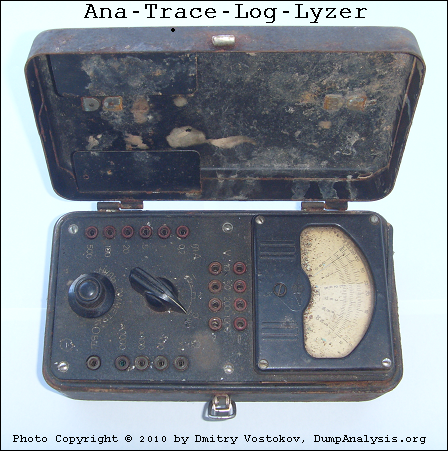
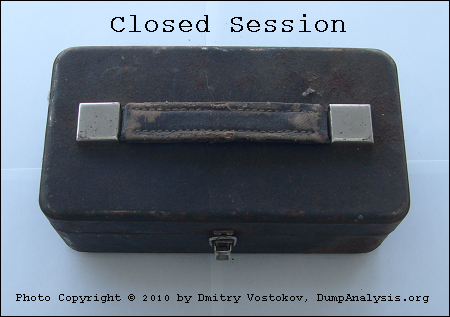
Ana-Trace-Log-Lyzer and Closed Session

Wednesday, June 2nd, 2010

This paleodebugging tool was excavated from Central Russia (thanks to Mr. Kutuzov) and generously provided for a photo session by its owner Mr. Mansour:


It also inspired this sequence of strcat: Analog -> Anatrace -> Analyzer -> Tracelyzer -> Loglyzer.

… enough tracing. It’s time to close our session:

… what is left? If you are curious, look at this conceptual picture:

Component Trace

If you wonder what electricity has to do with tracing (at a metaphorical level) look at this trace analysis pattern:

Statement Density and Current

- Dmitry Vostokov @ DumpAnalysis.org + TraceAnalysis.org -
Trace Analysis Patterns (Part 24)

Wednesday, June 2nd, 2010

The limit of Discontinuity pattern is No Activity. The absence of activity can be seen at a thread level or at a process level where it is similar to Missing Component pattern. The difference from the latter pattern is that we know for certain that we selected our process modules for tracing but don’t see any trace messages. Consider this example:

#  Source        PID  TID  Time         Function     Message
1  TraceSettings 1480 8692 08:04:20.682              **** Start Trace Session 
[... TraceSettings messages 2-11 show that we selected AppA for tracing ...]
12 ModuleB       3124 4816 08:04:37.049 WorkerThread Worker thread running
13 TraceSettings 1480 8692 08:04:41.966              **** Trace Session was stopped

Only modules from AppA process and modules from a coupled process (for example, ModuleB) were selected. However, we only see a reminder message from the coupled process (3124.4816:ModuleB!WorkerThread) and no messages for 21 seconds. Fortunately, AppA process memory dump was saved during the tracing session:

Debug session time: Fri May 21 08:04:31.000 2010 (GMT+0)

We see 2 threads waiting for a critical section:

0:000> ~*kL

  14  Id: 640.8b8 Suspend: 1 Teb: 7ffa7000 Unfrozen
ChildEBP RetAddr 
0248f8c0 7c827d29 ntdll!KiFastSystemCallRet
0248f8c4 7c83d266 ntdll!ZwWaitForSingleObject+0xc
0248f900 7c83d2b1 ntdll!RtlpWaitOnCriticalSection+0x1a3
0248f920 0040dea8 ntdll!RtlEnterCriticalSection+0xa8
[…]
0248f9a4 77ce78aa rpcrt4!Invoke+0×30
0248f9c0 77ce7a94 rpcrt4!NdrCallServerManager+0×17
0248fcb8 77ce7b7c rpcrt4!NdrStubCall+0×1d6
0248fcd0 77c7ff7a rpcrt4!NdrServerCall+0×15
0248fd04 77c8042d rpcrt4!DispatchToStubInCNoAvrf+0×38
0248fd58 77c80353 rpcrt4!RPC_INTERFACE::DispatchToStubWorker+0×11f
0248fd7c 77c7e0d4 rpcrt4!RPC_INTERFACE::DispatchToStub+0xa3
0248fdbc 77c7e080 rpcrt4!RPC_INTERFACE::DispatchToStubWithObject+0xc0
0248fdfc 77c812f0 rpcrt4!LRPC_SCALL::DealWithRequestMessage+0×41e
0248fe20 77c88678 rpcrt4!LRPC_ADDRESS::DealWithLRPCRequest+0×127
0248ff84 77c88792 rpcrt4!LRPC_ADDRESS::ReceiveLotsaCalls+0×430
0248ff8c 77c8872d rpcrt4!RecvLotsaCallsWrapper+0xd
0248ffac 77c7b110 rpcrt4!BaseCachedThreadRoutine+0×9d

  15  Id: 640.18c0 Suspend: 1 Teb: 7ffdb000 Unfrozen
ChildEBP RetAddr 
01b8ff40 7c827d29 ntdll!KiFastSystemCallRet
01b8ff44 7c83d266 ntdll!ZwWaitForSingleObject+0xc
01b8ff80 7c83d2b1 ntdll!RtlpWaitOnCriticalSection+0x1a3
01b8ffa0 0040dba7 ntdll!RtlEnterCriticalSection+0xa8
[…]
01b8ffec 00000000 kernel32!BaseThreadStart+0×34

Unfortunately it belongs to a missing thread and blocked threads wait forever:

0:000> !cs -l -o -s
-----------------------------------------
DebugInfo          = 0x01facdd0
Critical section   = 0x01da19c0 (+0x1DA19C0)
LOCKED
LockCount          = 0×2
WaiterWoken        = No
OwningThread       = 0×00001384
RecursionCount     = 0×1
LockSemaphore      = 0×578
SpinCount          = 0×00000000
ntdll!RtlpStackTraceDataBase is NULL. Probably the stack traces are not enabled

0:000> ~~[1384]
              ^ Illegal thread error in ‘~~[1384]’

Apparently AppA process was hanging and it explains why we don’t see any activity in the trace. We suggested to enable user mode stack trace database using this article as an example: CTX106970 and get a new dump.

- Dmitry Vostokov @ DumpAnalysis.org + TraceAnalysis.org -

Icons for Memory Dump Analysis Patterns (Part 45)

Tuesday, June 1st, 2010

Today we introduce an icon for Virtualized Process (WOW64) pattern:

B/W

Color

- Dmitry Vostokov @ DumpAnalysis.org + TraceAnalysis.org -