Archive for the ‘Books’ Category

Using scripts to process hundreds of user dumps

Thursday, December 28th, 2006

Suppose you have 100 - 200 user dumps from various user processes in the system and you want to quickly check their thread stacks, locks, etc. to see something suspicious related to your product or its environment your customers complaining about. It is much easier to collect such information into text files and browse them quickly than open every dump in WinDbg. I used shell script (VBScript) to automate loading dumps into WinDbg and used WinDbg scripts to run complex commands against loaded user dumps. For example, I used the following shell script:

'
' UDumps2Txt.vbs
'
Set fso = CreateObject("Scripting.FileSystemObject")
Set Folder = fso.GetFolder(".")
Set Files = Folder.Files
Set WshShell = CreateObject("WScript.Shell")
For Each File In Files
  Set oExec = WshShell.Exec("C:\Program Files\Debugging Tools for Windows\WinDbg.exe -y ""srv*c:\mss*http://msdl.microsoft.com/download/symbols"" -z " + File.Name + " -c ""$$><c:\scripts\UDmp2Txt.txt;q"" -Q -QS -QY –QSY")
  Do While oExec.Status = 0
     WScript.Sleep 1000
  Loop
Next
'
' UDumps2Txt.vbs: End of File
'

and the following WinDbg script:

$$
$$ UDmp2Txt: Dump information from user dump into log
$$
.logopen /d
!analyze -v
!locks
~*kv
lmv
.logclose
$$
$$ UDmp2Txt: End of File
$$

The following command launches multiple Dmp2Txt conversions:

C:\UserDumps>cscript /nologo c:\scripts\UDumps2Txt.vbs

You can also use CDB from Debugging Tools for Windows (console debugger) instead of WinDbg. I just use WinDbg uniformly instead of using separately CDB for user process dumps and KD for kernel and complete memory dumps. 

Now when you have text files you can search for patterns using regular expressions. I will write more about applying them later. There is a very good book about them from practical point of view I read 6 years ago when I needed to understand them beyond wildcards and question marks. Since that time the book has undergone another two editions:

Mastering Regular Expressions, 3rd edition

Buy from Amazon

Or you can process text files further and feed them into your database - part of automated crash dump analysis system.

- Dmitry Vostokov -

Real Programmers - no impossible code

Saturday, December 16th, 2006

I consider programmers as real programmers only if they attempted to write something like an editor or a word processor. My favorite interview question is “Did you write a word processor?” This probably explains why my team is small :-)

Why? Because writing a word processor shows your determination, persistence and if you are successful - understanding of OO principles. Even Gang of Four in their seminal book

Design Patterns: Elements of Reusable Object-Oriented Software

Buy from Amazon

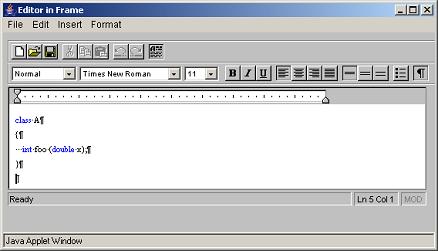
used word processor as a unified example. I was very satisfied when I read their book - I designed and implemented at least 2 word processors: one in pure C meant to be better than MS Write 3.x and one in Java with syntax highlighting. And I implemented design patterns without knowing they were design patterns. The Java one was better and here is the screen shot showing my editor with C/C++ syntax highlighting implemented in Java 1.0 without any 3rd-party class libraries:

e1.jpg

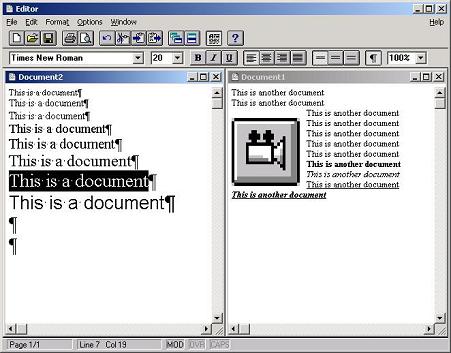
The earlier one (with Windows 3.x look and feel) was written in C and has MDI interface, floating embedded objects and printing support:

e2.jpg

- Dmitry Vostokov -
Crash Dump Analysis Patterns (Part 1)

Monday, October 30th, 2006

After doing crash dump analysis exclusively for more than 3 years I decided to organize my knowledge into a set of patterns (so to speak in a dump analysis pattern language and therefore try to facilitate its common vocabulary).

What is a pattern? It is a general solution you can apply in a specific context to a common recurrent problem.

There are many pattern and pattern languages in software engineering, for example, look at the following almanac that lists +700 patterns:

The Pattern Almanac 2000

and the following link is very useful:

Patterns Library

The first pattern I’m going to introduce today is Multiple Exceptions. This pattern captures the known fact that there could be as many exceptions (”crashes”) as many threads in a process. The following UML diagram depicts the relationship between Process, Thread and Exception entities:

Every process in Windows has at least one execution thread so there could be at least one exception per thread (like invalid memory reference) if things go wrong. There could be second exception in that thread if exception handling code experiences another exception or the first exception was handled and you have another one and so on.

So what is the general solution to that common problem when an application or service crashes and you have a crash dump file (common recurrent problem) from a customer (specific context)? The general solution is to look at all threads and their stacks and do not rely on what tools say.

Here is a concrete example from one of the dumps I got today:

Internet Explorer crashed and I opened it in WinDbg and ran ‘!analyze -v’ command. This is what I got in my WinDbg output:

ExceptionAddress: 7c822583 (ntdll!DbgBreakPoint)
   ExceptionCode: 80000003 (Break instruction exception)
  ExceptionFlags: 00000000
NumberParameters: 3
   Parameter[0]: 00000000
   Parameter[1]: 8fb834b8
   Parameter[2]: 00000003

Break instruction, you might think, shows that the dump was taken manually from the running application and there was no crash - the customer sent the wrong dump or misunderstood instructions. However I looked at all threads and noticed the following two stacks (threads 15 and 16):

0:016>~*kL
...
15  Id: 1734.8f4 Suspend: 1 Teb: 7ffab000 Unfrozen
ntdll!KiFastSystemCallRet
ntdll!NtRaiseHardError+0xc
kernel32!UnhandledExceptionFilter+0x54b
kernel32!BaseThreadStart+0x4a
kernel32!_except_handler3+0x61
ntdll!ExecuteHandler2+0x26
ntdll!ExecuteHandler+0x24
ntdll!KiUserExceptionDispatcher+0xe
componentA!xxx
componentB!xxx
mshtml!xxx
kernel32!BaseThreadStart+0x34

# 16  Id: 1734.11a4 Suspend: 1 Teb: 7ffaa000 Unfrozen
ntdll!DbgBreakPoint
ntdll!DbgUiRemoteBreakin+0x36

So we see here that the real crash happened in componentA.dll and componentB.dll or mshtml.dll might have influenced that. Why this happened? The customer might have dumped Internet Explorer manually while it was displaying an exception message box. The following reference says that ZwRaiseHardError displays a message box containing an error message:

Windows NT/2000 Native API Reference

Buy from Amazon

Or perhaps something else happened. Many cases where we see multiple thread exceptions in one process dump happened because crashed threads displayed message boxes like Visual C++ debug message box and preventing that process from termination. In our dump under discussion WinDbg automatic analysis command recognized only the last breakpoint exception (shown as # 16). In conclusion we shouldn’t rely on ”automatic analysis” often anyway and probably should write our own extension to list possible multiple exceptions (based on some heuristics I will talk about later).

- Dmitry Vostokov @ DumpAnalysis.org -

Applying API Wrapper Pattern

Monday, October 30th, 2006

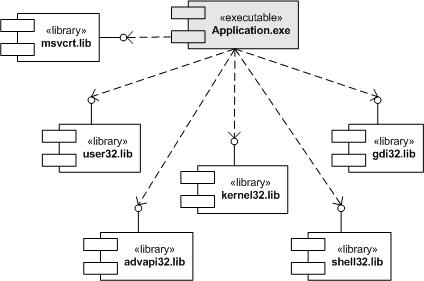
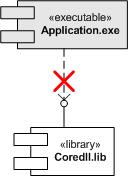
Recently I had been porting my old Win32 legacy project (more than 100,000 lines) to Windows Mobile. Here I summarize the approach I used and I can say now that it was very successful (no single crash since I finished my porting - the original Win32 program was very stable indeed but we all know that hidden bugs surface or introduced when project is ported to another platform). The project was written in Windows 3.x 16-bit era and then it was already ported to Win32 in Windows 95 era. Win32 interface is huge and it contains many legacy Win16 functions (mainly for easy portability and compatibility with existing Win16 code base). The following UML component diagram depicts application dependencies on many Win32 API and runtime libraries from build perspective:

Windows Mobile (in essence Windows CE) has smaller interface and many functions available in Win32 API (especially legacy Win16) and many C runtime functions are absent. My project uses many such functions (due to its history) so the interface becomes broken. The following UML component diagram depicts this dependency:

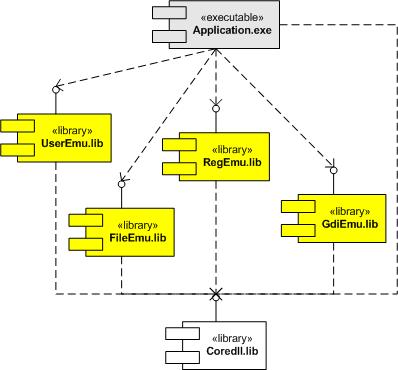
First I ported my project to use UNICODE strings and UNICODE function equivalents throughout. This was a huge task already. Then instead of further rewriting my code which uses many absent functions and therefore quite possibly to introduce new bugs due to changed semantics I decided to apply a variant of Adapter or Wrapper pattern (for non-object-oriented API). My application now still uses old functions but links to a set of libraries translating these calls into existing Windows CE API. The following UML component depicts the final component infrastructure from build perspective:

Here is the list of functions I had to translate:

- RegEmu.lib: translates INI file calls into registry

  • GetProfileString
  • GetProfileInt
  • GetPrivateProfileString
  • GetPrivateProfileInt
  • WriteProfileString
  • WritePrivateProfileString

- FileEmu.lib: various file system related calls

  • _lcreatW
  • _lopenW
  • OpenFileW
  • WinExecW
  • _wsplitpath
  • _wsplitpathparam
  • _waccess
  • _wmkdir
  • _wrename
  • _wfindfirst
  • _wfindnext
  • _findclose
  • _wunlink
  • _wrmdir
  • _llseek
  • _lclose
  • _hread
  • _hwrite
  • _lread
  • _lwrite
  • _wstat
  • _wgetcwd
  • _wmakepath
  • _chdrive
  • _wchdir
  • ShellExecute
  • GetWindowsDirectory
  • GetSystemDirectory

- GdiEmu.lib: various graphics functions

  • SetMapMode
  • CreateFont
  • CreateDIBitmap

- UserEmu.lib: various UI related functions

  • GetKeyNameText
  • GetScrollPos
  • GetScrollRange
  • GetLastActivePopup
  • IsIconic
  • IsZoomed
  • IsBadStringPtr
  • IsMenu
  • VkKeyScan
  • GetKeyboardState
  • SetKeyboardState
  • ToAscii
  • MulDiv

PS. If you are interested in applying patterns to your C++ projects or simply in using them to describe your design and architecture these books are good place to start:

Design Patterns: Elements of Reusable Object-Oriented Software

Buy from Amazon

Pattern-Oriented Software Architecture, Volume 1: A System of Patterns

Buy from Amazon

Pattern-Oriented Software Architecture, Volume 2, Patterns for Concurrent and Networked Objects

Buy from Amazon

- Dmitry Vostokov -
UML and Device drivers

Sunday, October 8th, 2006

I got the impression after reading numerous books and articles about device drivers that UML is almost never used in describing kernel and device driver design and architecture. Everything is described either by words or using proprietary notations. If you don’t know about UML (Unified Modeling Language) it is time to learn because it is an industry standard general purpose modeling language with graphical notation. You can find many good tutorials on the Web and I can recommend the book to start:

UML Distilled: A Brief Guide to the Standard Object Modeling Language, Third Edition

Buy from Amazon

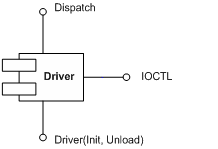
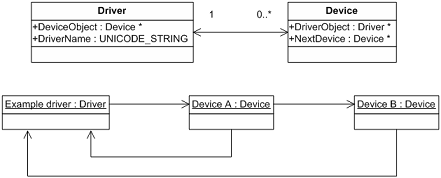
Recently I created some diagrams based on my past experience in using UML to describe and communicate architecture and design:

0. Component diagram depicting major driver interfaces 

driverinterfaces2.JPG

1. Class and object diagram depicting relationship between drivers and devices

 Drivers and Devices

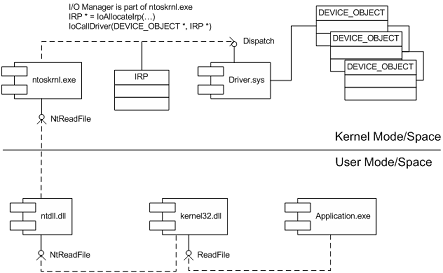
2. Component diagram showing dependencies and interfaces when calling Win32 API function ReadFile

iomanager.JPG

3. Component diagram showing IRP flow in a driver stack (driver-to-driver communication)

Actually I found that some driver books incorrectly depict the ordering of I/O stack locations in IRP stack corresponding to driver or device stack. The correct layout is depicted above. IRP I/O stack locations grow down (to lower addresses) in memory like any other Wintel stack. You can see it from kernel dumps or the following macro from DDK header file wdm.h which shows that next IRP I/O stack location is down in memory (1 is subtracted from current stack location pointer):

#define IoGetNextIrpStackLocation( Irp ) (\
    (Irp)->Tail.Overlay.CurrentStackLocation - 1 )

Dumps (and live debugging) are good in studying component relationships, reconstructing sequence diagrams, etc. For example, this edited fragment below is from crash dump and it shows who calls whom and component dependencies be reconstructed from call stack of Win32 API function GetDriveType: SHELL32 (calls it) -> kernel32 -> ntdll -> nt (ntoskrnl.exe). You can also see various Citrix hooks and filters here (CtxSbxXXX):

kd> kL
CtxSbx!xxx
nt!IovCallDriver
nt!IofCallDriver
CtxAltStr!xxx
nt!IovCallDriver
nt!IofCallDriver
nt!IopParseDevice
nt!ObpLookupObjectName
nt!ObOpenObjectByName
nt!IopCreateFile
nt!IoCreateFile
nt!NtOpenFile
nt!KiSystemService
SharedUserData!SystemCallStub
ntdll!ZwOpenFile
CtxSbxHook!xxx
kernel32!GetDriveTypeW
SHELL32!CMountPoint::_EnumMountPoints

- Dmitry Vostokov -

Studying Linux kernel

Thursday, October 5th, 2006

I believe studying Linux kernel and playing with it will broaden your conceptual understanding of kernel development and issues and you can apply it to Wintel stuff too. I’m not a complete Windows guy as you might think after reading my previous posts. I spent 1.5 years (before joining Citrix) under RedHat Linux writing C++ software quality tools in C++ using Emacs editor (working for Programming Research Ltd www.programmingresearch.com). And I did multi platform (Windows - Linux - Solaris) architecture, design and programming for Boeing Commercial Airplanes Group 6 years ago (when working for the biggest Russian outsourcing company Luxoft www.luxoft.com). Coupled with all this prior knowledge about Linux I’m on my journey to study the latest Linux kernel (2.6) and I would recommend 2 wonderful books I’m reading now:

Linux Kernel Development, 2nd Edition

Buy from Amazon

Understanding Linux Kernel, 3rd Edition

Buy from Amazon

and another fantastic book about Unix internals in general:

UNIX Internals

Buy from Amazon

- Dmitry Vostokov -