Crash2Hang
Sometimes there is a need to preserve a crashing application or a service from termination and keep it in memory without showing any GUI dialogs or message boxes. Here Crash2Hang tool comes handy. It is free and can be downloaded from here:

The source code is simple as possible:
// Crash2Hang

// Copyright (c) 2009 Dmitry Vostokov

// GNU GENERAL PUBLIC LICENSE

// http://www.gnu.org/licenses/gpl-3.0.txt
#include <windows.h>
int main(int argc, WCHAR* argv[])

{

 if (argc > 1)

  MessageBox(NULL, L"One of processes has called a postmortem debugger!", L"Crash2Hang", MB_OK | MB_ICONSTOP | MB_SETFOREGROUND);

 else

  Sleep(INFINITE);

 return 0;

}
The tool can be used as a postmortem debugger specified in AeDebug registry key, for example, instead of CDB. Any argument specified to Crash2Hang.exe causes it to display a message box when launched
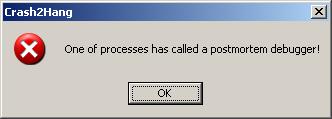
and exit process upon its dismissal. If several threads in a problem process experience an unhandled exception then Crash2Hang process is launched several times which may result in several such message boxes. Without arguments Crash2Hang process hangs infinitely causing the problem thread with an unhandled exception to hang indefinitely too (see my old post Who calls the postmortem debugger? for explanation).
- Dmitry Vostokov @ DumpAnalysis.org -
December 31st, 2008 at 4:29 pm
[…] The Year of DebuggingTo test various postmortem debuggers to their fullest potential and especially Crash2Hang I wrote another small program that models multiple exceptions in several threads. It is free and […]
November 25th, 2009 at 10:49 pm
[…] if we preserve the crashed process, for example, using Crash2Hang tool (http://www.dumpanalysis.org/blog/index.php/2008/12/29/crash2hang/) we might temporarily preserve functionality of the remaining services (if there is no […]