How old is your application or system?

CARE: Crash Analysis Report Environment

DATA (Dump Analysis + Trace Analysis) Facebook group
Please join the community of memory (dump) and trace analysis engineers. This group promotes scientific methods and memory dump-based worldview.

Twitter @ DumpAnalysis
You can now follow portal and blog news at DumpAnalysis on Twitter

LinkedIn Group Dr. Watson Enthusiasts
All about Dr. Watson errors and more. Get news, excerpts and progress reports about the forthcoming book The Science of Dr. Watson: An Illustrated History of Debugging (ISBN 978-1906717070)

2010 (0x7DA) - The Year of Dump Analysis
2011 (0x7DB) - 2020 (0x7E4) The Debugging Decade

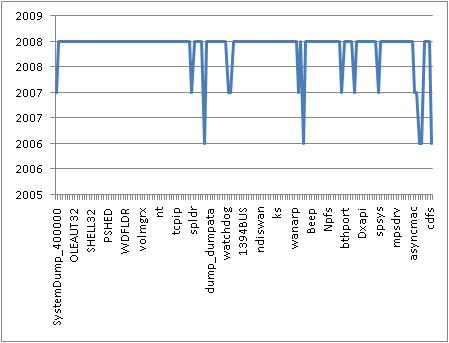
Component Age Diagram (CAD) helps to visualize and pinpoint anomalies in component timestamps. Excel helps here. We can import the output of lmt WinDbg command and get these graphs where peaks can be used to identify old modules. For example, here is a CAD from my Windows Vista SP1 running on MacMini:
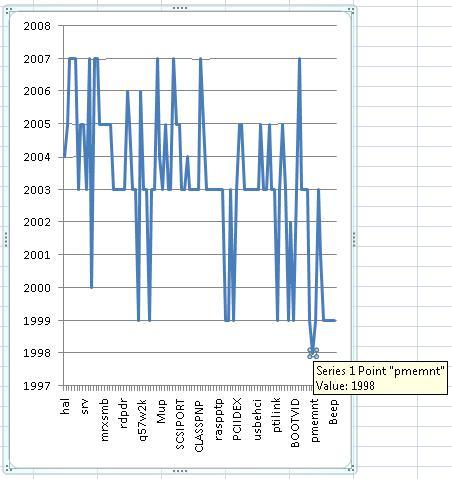
Here is another CAD from Windows 2000 server where the oldest driver is easily identified:
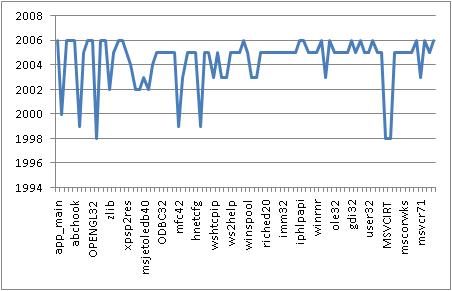
The following CAD diagram is created from lmt output in Module Variety pattern example:
- Dmitry Vostokov @ DumpAnalysis.org -


Announcements

Coming Soon:

Debugging Notebook: Essential Concepts, WinDbg Commands and Tools

Crash Dump Analysis for System Administrators and Support Engineers

New Magazines:

Debugged! MZ/PE: MagaZine for/from Practicing Engineers


New Books:

Memory Dump Analysis Anthology, Volume 3

First Fault Software Problem Solving: A Guide for Engineers, Managers and Users

x64 Windows Debugging: Practical Foundations

Also available:

Windows Debugging: Practical Foundations

DLL List Landscape: The Art from Computer Memory Space

Dumps, Bugs and Debugging Forensics: The Adventures of Dr. Debugalov

WinDbg: A Reference Poster and Learning Cards

Memory Dump Analysis Anthology, Volume 2

Memory Dump Analysis Anthology, Volume 1

New Children's Book:

Baby Turing

One Response to “How old is your application or system?”

  1. Crash Dump Analysis » Blog Archive » Crash Dump Analysis Patterns (Part 65) Says:

    […] command will produce the necessary output. If there are many modules we might want to create a CAD graph (Component Age Diagram) to spot anomalies. Component version check is one of the basic […]

Leave a Reply